


I tested both platforms to see how they perform across critical areas. From building workflows with Gmail triggers and switches in n8n to exploring Dify’s pre-built templates and AI orchestration studio, I wanted to understand not just what each tool promises but how they actually perform in practice.
If you’re trying to decide between n8n and Dify, this hands-on comparison will walk you through the real differences that matter.
n8n vs Dify: Quick Summary
| Area | n8n | Dify |
|---|---|---|
| Onboarding | Straightforward sign-up, with clear starter workflows and docs that guide you step by step. | Seamless sign-up, drops you into “Studio” with templates to spin up AI apps quickly. |
| Workflow Design | Node-based editor. Drag fields from trigger JSON to map downstream steps. | Template-driven “Studio.” Focused on AI-first workflows. |
| Debugging | Run nodes individually, inspect execution data, view detailed logs, and re-run failed jobs. | Basic error handling. Logs available, but less granular. |
| AI Capabilities | Supports agents, RAG pipelines, OpenAI, Anthropic, Hugging Face, and more. | AI-native platform. Built-in prompt orchestration. |
| Pricing and Scalability | Per-execution model. Cloud plans from $20/month. Free self-hosting. Enterprise features for scaling. | Free sandbox with 200 calls. Paid plans start at $59/month. |
| Support and Community | Strong documentation, active forum + Discord, peer support. Direct support only for enterprise. | Comprehensive docs, very active Discord, and direct team support for all tiers. |

Quick Overview of n8n and Dify
What is n8n?
n8n is a powerful open-source automation platform built for technical teams. It combines visual drag-and-drop workflows with the flexibility of code, letting you connect 500+ apps, create multi-step automations, and even self-host for complete data control. Its enterprise features ensure scalability, security, and collaboration.
What is Dify?
Dify is an open-source platform for building agentic AI applications, workflows, and RAG pipelines. It offers no-code workflow design, plugin integrations, and enterprise-grade infrastructure, making it easy to deploy production-ready AI apps. With 100k+ GitHub stars and growing adoption, Dify helps teams launch scalable, production-ready AI solutions quickly while supporting collaboration across industries.
1. Sign-Up and Onboarding
Whenever I test an automation or AI platform, the first thing I look at is how easy it is to get in and start building.
Sign-up and onboarding matter because they set the tone. If a platform feels clunky or confusing here, it usually means the rest of the user experience will follow the same path.
With both n8n and Dify, I wanted to see how quickly I could register, what kind of friction I might face, and how the workspace looked once I logged in for the very first time.
My Experience with n8n
n8n gives you two main choices out of the gate:
- Use their hosted service on n8n.cloud
- Or self-host the platform on your own infrastructure
For my first run, I decided to go with the cloud-hosted option to get started quickly without touching servers.
The process started on the homepage, where I clicked the “Get started for free” button.

The registration form asked for my full name, a company email (with confirmation), a password, and an account name, which also becomes part of your subdomain (e.g., yourname.n8n.cloud).
One thing I appreciated was that no credit card was required to start the free trial. It’s a full 14-day trial with 1,000 workflow executions included, and I was taken straight to the dashboard after signing up.
The dashboard itself was refreshingly minimal. A simple top menu had just three items: Dashboard, Manage, and Help Center.

In the main area, my instance name was clearly displayed along with a large “Open Instance” button that launched the automation builder. I also liked that my trial status was front and center. It showed exactly how many days I had left and what my usage limits were.
There were no intrusive pop-ups or forced tutorials. Instead, it felt like n8n trusted me to explore on my own, which I found very developer-friendly.
Clicking “Open Instance” dropped me into the Workflow Dashboard, the real workspace where automations are built. The screen was more detailed, with options to add nodes, manage executions, and start building right away.

Of course, n8n’s real power comes from self-hosting. You can install it almost anywhere using npm or Docker, or follow guides for cloud platforms like AWS, GCP, or DigitalOcean.
But self-hosting isn’t for beginners. It involves configuring servers, managing resources, scaling, and securing the instance with SSL, authentication, and environment variables. n8n themselves recommend self-hosting only if you have solid technical knowledge. Otherwise, the hosted version is far simpler and gets you productive immediately.
That said, if you do go the self-hosting route, you avoid limitations like cloud instances going idle after inactivity.
You might also want to explore the best n8n hosting providers so your workflows run smoothly without downtime. For example, if you choose Hostinger, you can cut expenses by using their n8n hosting coupon codes and discounts.
For enterprises, there’s even a licensed self-hosted edition with features like SSO, version control, and advanced permissions.
My Experience with Dify
Dify took a very different approach, one that immediately stood out for its speed. Their homepage is sleek and modern. Naturally, I wanted to see if the actual sign-up experience matched the polish of their branding.
The entry point was obvious: a “Get Started” button sitting at the top right.

Clicking it brought me to the login page, where I got three options: Continue with GitHub, Continue with Google, or simply use an email address. I opted for email to keep things neutral.
After typing my email address and hitting “Continue with Code,” I received a prompt telling me to check my inbox. Within seconds, an email titled “Dify Login Code” landed in my inbox with a six-digit verification code.
Copying it over and hitting “Verify” completed the process. No passwords to create, no forms to fill. The whole flow took less than a minute, making it one of the fastest sign-up experiences I’ve had with any automation tool.
Once verified, I landed in my workspace, and my first impression was how clean and intuitive it felt. The main panel was a blank slate labeled “No apps found”, but the sidebar immediately guided me to the next step with three big options: Create from Blank, Create from Template, or Import DSL file.

Dify showed me exactly how I could begin building.
Exploring the interface further, the top navigation bar revealed tabs like Workflow, Chatflow, Chatbot, Agent, and Completion, each pointing to a different type of AI-powered solution I could build.
Other sections like Explore, Studio, Knowledge, Tools, and Plugins hinted at more advanced capabilities.

I clicked on Explore, and this section is essentially a gallery of pre-built apps and templates, organized into categories like “AI Coding,” “Customer Service,” “Data Analysis,” and more. For example, I found templates for things like Code Interpreter, Customer Review Analysis Workflow, and even an Investment Analysis Copilot.

Having that library available from the start made it easy to imagine use cases and gave me a head start if I wanted to customize instead of building from scratch.
The Knowledge and Tools sections went even deeper. Knowledge lets you upload or connect external data sources to feed into your AI applications, while Tools showcased built-in utilities (like WebScraper and Code Interpreter) and an extensive plugin marketplace with integrations for Google, GitHub, and even image generation with DALL-E or Stable Diffusion.

All of this came together in a way that felt polished and production-ready from the moment I logged in.
Dify’s onboarding was fast and inspiring because within a few clicks I was already browsing working AI demos I could run and customize.
And the Winner is Dify!
Between the two, Dify clearly wins the sign-up and onboarding round. The entire process took me less than a minute. No passwords, no forms beyond my email, and no credit card walls. I was inside the platform almost instantly, greeted with a clean workspace and guided paths to start building.
2. Visual Editor and Workflow Design
After signing up, my next focus was the visual editor. I wanted to see how well each tool balanced ease of use, flexibility, and transparency.
My Experience with n8n
Instead of building a toy example, the workflow I had in mind was an email triage bot. Something that watches my Gmail inbox, classifies emails by type, summarizes job opportunities with AI, logs everything into a Google Sheet, and pushes urgent alerts to Slack or Telegram.
When I opened the Workflow Dashboard in n8n, I was greeted with a wide canvas and a node sidebar. The design is simple but powerful: every workflow starts with a trigger, and then you drag in nodes to define what happens next.
I began with the Gmail Trigger. Once I dropped it onto the canvas, the first thing n8n asked me to do was fetch a test event.

This step is crucial. It doesn’t just test the connection; it also pulls in real sample emails from your inbox.
I clicked Fetch Test Event, and within seconds, a couple of my recent emails appeared in the test panel. Each email came with a JSON structure containing fields like:
- from (sender email address)
- subject
- text (body snippet)
- Date

This matters because when you add your next node, you already have this data available for mapping. Instead of guessing what fields you can use, n8n makes them tangible. You just drag and drop from the test event JSON into your new node’s configuration.
It’s a very hands-on, developer-friendly workflow. You always know exactly what data is flowing through your pipeline.
With the Gmail trigger feeding real emails, I added a Switch node. Its job was to look at the subject and snippet and decide what to do next. Thanks to the test event I had already pulled, I could drag fields like subject or text directly into the Switch’s conditions.
I set up rules like this:
- If subject contains “invoice” → go to the Invoice branch.
- If subject or text contains “job” → go to the Job branch.
- If subject contains “urgent” → go to the Urgent branch.
- Everything else → General branch.

What I liked here was how visual the logic felt. Instead of abstract rules, I could literally point to the real data and say “when this field contains this word, do that.”
For invoices, I connected a Google Sheets node. Because my trigger had already pulled email data, mapping was as easy as dragging fields (from, subject, date) into the correct columns.
Every invoice email added a row to my sheet with:
- Date
- From
- Subject
- Snippet
- Category = “Invoice”
- AI Summary = blank (not needed here)

This turned into a running log I could share with finance or reconcile later.
Job emails were where I wanted AI. I added a Gemini node and wrote a custom prompt:
“Summarize the job posting in 2 sentences and classify it as Inquiry, Offer, or Other.”
The AI summary (ai_summary) was then mapped into the Google Sheet alongside the original details. Again, thanks to the test event, mapping was drag-and-drop, I didn’t have to type field names or guess at formats.
The result: a searchable, scannable job log. Instead of opening long emails, I could just read the summaries.
Urgent emails got a two-step treatment:
- Logged into Sheets like the others.
- Sent to Slack and Telegram as formatted alerts.
This gave me instant push notifications without losing the structured log.
Everything else flowed into the General branch and into the same Google Sheet.
What struck me most was how cohesive the workflow felt. At every stage, I was working with real data from my inbox. I could test nodes in isolation, see JSON outputs, and then map those fields into the next step.
That feedback loop — execute, test, map — made the whole process feel transparent and reliable.
My Experience with Dify
After the seamless sign-up, I landed in the Dify Studio. Here, the workflow design experience starts differently. Instead of wiring raw logic, Dify focuses on building AI-powered applications.
I didn’t want to start with a blank canvas. What I was looking for here was to see how Dify handles AI orchestration out of the box, so I went straight into “Create from Template.”

The template library immediately impressed me. Categories like “AI Coding,” “Customer Service & Operations,” and “Data Analysis” gave me a clear sense of what was possible.
I picked the Investment Analysis Report Copilot from the Recommended section because it looked like a practical test case: pulling stock data, analyzing it, and returning a structured report.

Once loaded, I landed in the Orchestrate tab. This is where Dify defines the “personality” and workflow of your AI app. The template already had a structured instruction prompt, skills, and tools pre-configured:
- Skill 1: Use Yahoo Ticker to get stock data.
- Skill 2: Use Yahoo News to fetch updates.
- Skill 3: Use Yahoo Analytics to gather financial figures.
I could immediately see how this app would behave, and I had options to add more knowledge sources or variables.

Before running the app, Dify asked me to install two plugins: Yahoo Finance and OpenAI. I did hit a small error at first (“provider does not exist”), but reinstalling fixed it quickly.
Then came the interesting part, choosing a model. In the Debug & Preview panel, I swapped from GPT-4 to Gemini 2.5 Flash-Lite. Dify warned me about incompatible parameters (like frequency_penalty) with Gemini, which was useful because it prevented silent failures. Configuring Gemini was as simple as pasting in my API key.
With everything set, I typed, “Analyze the stock of Tesla.”
On the right, the chat interface showed me the output, but what impressed me was the transparency under the hood. Dify displayed which tools were being called (ticker, analytics, news), the raw JSON responses, and how the agent stitched them into a final report.

The output was a detailed financial report with sections on:
- Company intro
- Financial statement analysis
- Ratio analysis
- Risks and opportunities
I tried again with Amazon, and the app produced a similarly structured report, pulling live ticker data, analytics, and news.
Other Tabs
- API Access: Auto-generated endpoints for integrating this agent into other systems.
- Logs & Annotations: Complete records of my queries, responses, and tool usage.
- Monitoring: Metrics like total conversations, token usage, active users, and satisfaction.
Dify’s workflow design felt less like dragging logic nodes and more like configuring a production-ready AI agent.
And the Winner is n8n!
With n8n, I built an email triage bot from scratch, testing nodes, pulling real data, and mapping fields step by step. I had total visibility into what data was flowing where.
3. Debugging and Testing
When I test automation platforms, I always pay close attention to debugging and testing. Why? Because when building workflows, things go wrong.
APIs throw errors, models time out, inputs don’t match expectations. The real question is: how fast can I find and fix the issue?
To really stress-test both n8n and Dify, I built and ran more complex AI-powered workflows, deliberately causing errors along the way, so I could see how each platform helped (or hindered) the troubleshooting process.
My Experience with n8n
For n8n, I tested debugging with a workflow designed to generate AI content. I clicked Execute Workflow to kick it off, and almost immediately one of my AI Agent nodes turned red on the canvas.

n8n’s feedback was immediate and layered:
- The node itself turned red.
- A pop-up message appeared, pointing directly at the failing node.
- Most importantly, the error wasn’t generic. It told me the issue was inside a sub-node: “LLM: Generate Raw Idea (GPT-4.1).”
- The error code was 404, and n8n even included a troubleshooting link to the underlying LangChain library documentation.
Instead of staring at a vague “something broke” message, I knew exactly what failed and had resources to fix it.
At the bottom left of the screen, the Logs panel gave me a hierarchical view of the entire execution. I could expand each step to see exactly what succeeded and what failed. In this case, the Gmail trigger had succeeded, but the AI Agent failed.

Clicking the failed node updated the Output panel in the center. Here, I saw the full error message:
“The resource you are requesting could not be found.”
There was even an Ask Assistant button to help diagnose further. Between the canvas highlight, the pop-up, the logs, and the detailed output, I had a complete picture of the failure from multiple angles.

Re-Running a Specific Step
I didn’t have to re-run the entire workflow. Instead, after fixing the error (in this case, correcting the authentication key), I clicked Execute Node. n8n reran just that node with the existing input data from the Gmail trigger.

That ability to surgically test one node at a time is a massive productivity boost. I often even drop in a Set node upstream with test data, run it once, and then repeatedly execute my target node until it works. It’s essentially unit testing directly on the canvas.
n8n also keeps a permanent Executions log, accessible from the top panel. When I opened my failed run here, it loaded the workflow in read-only mode, frozen at the exact state of failure.
This is fantastic for post-mortem debugging. I could study what happened without disturbing my current editor.

For production, I tested n8n’s Error Workflow feature. I created a separate workflow with an error trigger, connected it to a Slack node, and configured it to fire whenever another workflow failed. Then I linked it to my AI content workflow.

Now, if that workflow fails in the background, n8n automatically triggers my error workflow and sends me a Slack alert with full error details. It’s a set-and-forget monitoring system that saves me from babysitting logs.
Finally, I tested the Stop and Error node, which lets you intentionally throw an error if data isn’t valid. For example, if I expect a numeric price but receive a string, I can stop execution right there with a custom message like:
“Error: Price field missing or not a number.”
This prevents bad data from silently corrupting downstream systems.

Between node-level testing, execution history, error workflows, and proactive validation, n8n gave me the most comprehensive debugging toolkit I’ve used in any automation platform.
My Experience with Dify
Even though Dify is template-driven, debugging is just as important, especially because most errors stem from model configurations or external APIs.
My first real troubleshooting moment came when testing the Investment Analysis Report Copilot.
Scenario 1: Model Incompatibility
I switched the default model from gpt-4-1106-preview to chatgpt-4o-latest in Debug & Preview and ran: “Do a fundamental analysis for Amazon.”
Almost instantly, a red banner appeared:
“Bad Request Error: 404 — Tool is not supported in this model.”
It was clear, precise, and even linked to OpenAI’s documentation. That clarity saved me from hunting blindly. I knew right away it was a model-tool mismatch.

Checking the Logs & Annotations tab, I could see both the successful Tesla run and the failed Amazon run. Clicking into the failure revealed the exact prompt, which tools the agent attempted (yahoo_finance_ticker, yahoo_finance_analytics), and the returned error.
Scenario 2: Workflow Node Failures
I then tested a different template: URL-to-Cross-Platform-Copywriting. On launch, Dify prompted me to install plugins (Jina AI, getimg.ai, Anthropic).
- When I clicked Start without providing a URL, Dify immediately flagged: “Link is required in input form.” — simple, effective input validation.
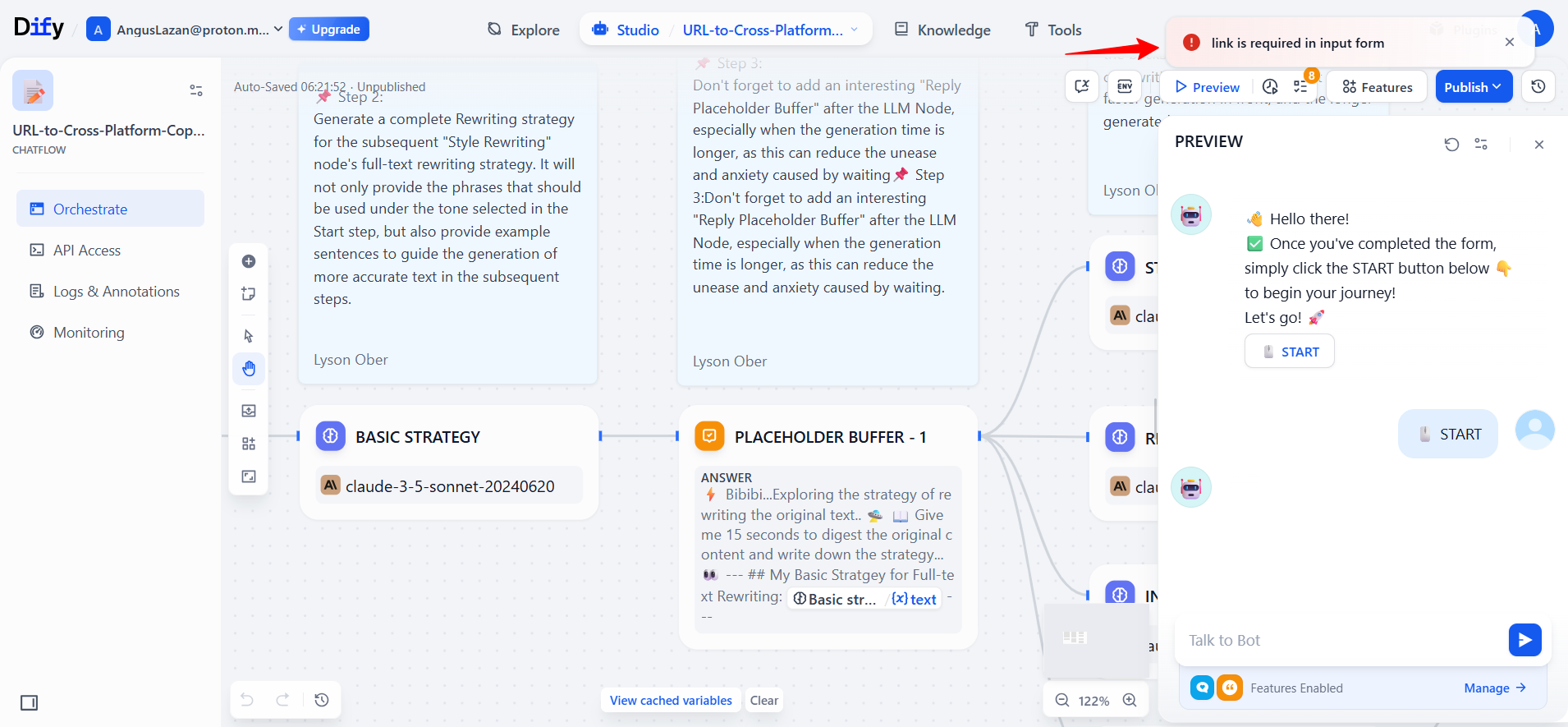

- After adding a URL, the workflow failed again: “Run failed: no default provider for Jina.”

The failing node—JinaReader—was visually highlighted with a red border. Clicking it opened its Last Run tab, showing Status: FAIL, elapsed time, and even the raw JSON input/output.
This let me confirm that the issue wasn’t the input (the link had passed correctly) but the node itself.

Like n8n, Dify allowed me to run just that specific node again, rather than restarting the whole workflow.

Dify also provides built-in error handling options:
- Retry on failure (with configurable retries and intervals).
- Default fallback values.
- Fail branches to route errors into alternative paths.
This means you can design workflows that degrade gracefully instead of breaking outright.
On top of node-level debugging, Dify’s Monitoring tab gave me metrics like total conversations, token usage, and session lengths. While not as granular for step-by-step debugging, this higher-level visibility helps spot systemic issues like latency or excessive costs.
And the Winner is n8n!
Both platforms are strong here, but I give the edge to n8n for debugging and testing. I could run individual nodes, re-run past executions with pinned data, and trace failures in a hierarchical log. Additionally, Error Workflows are a killer feature, automatically alerting me in Slack when background runs fail.
4. Integrations and AI Capabilities
I wanted to know two things here:
- How wide is the integration library—do they support the apps I already use every day?
- How deeply do they support AI capabilities—can I just call an API, or can I actually build intelligent, agent-like systems with memory, retrieval, and reasoning?
My Experience with n8n
n8n is an integration powerhouse. Their library now spans over 1,100 integrations, and it’s not just about popular SaaS apps. The breadth covers everything from Slack and Google Sheets to hardcore developer tools, databases, and even low-level protocols.
Beyond the usual suspects (Slack, Gmail, Notion, Airtable), n8n includes:
- Databases: PostgreSQL, MySQL, MongoDB.
- Developer Platforms: GitHub, GitLab, Bitbucket.
- Protocols: Webhooks, GraphQL, IMAP Email, and the all-important HTTP Request node.
Where many automation tools give you “just the basics” (e.g., send a Slack message), n8n goes further. Its nodes expose much more of the underlying API functionality.
For example, the Gmail node doesn’t just send or fetch emails. It exposes metadata, labels, snippets, and thread information. That means I can build more precise automations without constantly falling back to raw API calls.
AI as a Core Component
This is where n8n really differentiates itself. AI is a first-class category in the editor. Inside the AI node library, I found:
- Language Models: Connectors for OpenAI, Anthropic (Claude), Google Gemini, Hugging Face, and even local models.
- Agents: Framework to create reasoning agents that can call tools, act autonomously, and chain decisions.
- Memory: Persistent state so your agents can remember past context.
- Vector Stores: Pinecone, Weaviate, Supabase, Zilliz — perfect for Retrieval-Augmented Generation (RAG).
- Embeddings, Retrievers, and Output Parsers: The low-level building blocks to do things like semantic search, document ingestion, and structured AI outputs.

I could build AI systems: agents that reason, pull from my own data, and interact with APIs as part of a bigger workflow.
Example: I could create an agent that receives a support ticket, searches my internal knowledge base via vector search, asks Gemini to draft a response, and then posts it into Zendesk for approval.
My Experience with Dify
If n8n is about giving developers total control, Dify positions itself as a dedicated platform for building generative AI applications.
It’s less about having 1,100 integrations and more about creating a deep ecosystem specifically tuned for AI-first workflows.
Dify is model-agnostic. Out of the box, I could connect to:
- OpenAI’s GPT models.
- Anthropic’s Claude.
- Google Gemini.
- Hugging Face models.
- Local deployments like LLaMA.
- Newer players like DeepSeek R1.

Switching models was seamless. I didn’t have to rewrite prompts. Just pick a new model from a dropdown and, in most cases, re-run. For testing, I swapped between GPT-4o and Gemini 2.5 Flash without breaking the workflow.
One of Dify’s standout features is its built-in support for Retrieval-Augmented Generation (RAG). Using integrations like Zilliz Cloud, I could connect my app to vector databases and build assistants that ground their answers in real documents or data.
This is huge for enterprise use cases. Think compliance bots, policy assistants, or research copilots.
Agent Framework
Dify also supports full-blown agents. These can invoke tools, process inputs, and autonomously execute steps in a workflow.
Combined with integrations like Google Search, Linkup API (for live web data), or Mem0 (for conversation memory), Dify agents start to feel like custom-built digital employees.

Another key strength is integrations like Langfuse. This adds observability — tracking prompts, responses, and user interactions. For a developer, that means I could see where an agent was underperforming, version-control my prompts, and optimize over time.
While Dify doesn’t boast 1,100 integrations like n8n, it connects to the right kinds of external services for AI apps:
- ApiX-Drive (bridging 290+ SaaS tools).
- Databases (for grounding AI in structured data).
- Custom APIs (via HTTP endpoints). And thanks to the plugin marketplace, this ecosystem is rapidly expanding.
What struck me is how streamlined the process felt. Instead of stitching AI into a workflow, as I did with n8n, Dify felt like it was purpose-built to orchestrate AI from the start.
Tie. It depends on your goals.
This is the first section where I couldn’t pick a single winner, because the two platforms shine in different directions.
5. Pricing and Scalability
Pricing models in automation tools matter as much as features. The way a platform charges you can encourage experimentation or punish you for complexity.
My Experience with n8n Pricing
n8n’s model is refreshingly straightforward: “Build as much as you want. Pay only when your workflows run.”
The key word is execution. An execution is counted every time a workflow completes from start to finish. Whether your workflow has 2 steps or 200 steps, it’s still one execution. This is huge if you’re building complex, multi-step automations. You don’t get penalized for chaining together many integrations.
Hosting Options and Plans
n8n gives you two paths:
- Cloud Plans (Hosted by n8n). If you don’t want to mess with servers, you can sign up for n8n.cloud, starting at $20/month for the Starter tier. All cloud plans come with a 14-day free trial.
- Self-Hosted Plans. This is where n8n really differentiates itself.
- Community Edition: Free and open source. You can run it on your own machine, a VPS, or cloud provider (AWS, GCP, DigitalOcean). Your only limits are your hardware and how much you can manage.
- Business/Enterprise: For larger teams self-hosting, you can purchase licenses for advanced features like SSO, version control, enterprise scaling, and dedicated support.
The Trade-offs of Self-Hosting
Self-hosting sounds free, but I quickly realized there are hidden costs:
- Server costs (cloud VM or dedicated machine).
- Maintenance time (backups, scaling, updates).
- Security hardening (SSL, firewalls, authentication).
So while the Community Edition is amazing for developers and tinkerers, businesses should factor in these overheads before assuming “free hosting” equals “zero cost.”
My Experience with Dify Pricing
Dify takes a more tiered SaaS approach with clear limits tied to message credits, apps, and storage. Signing up gave me 200 free OpenAI calls, no credit card required.
Here’s how the plans break down:
- Sandbox (Free). This is fine for experimentation but quickly too small for real projects.
- Professional ($59/workspace/month). This is the real entry point for production apps. Enough scale for small teams and early deployments.
- Team ($159/workspace/month). Clearly aimed at larger teams that need collaboration and throughput.
Dify’s pricing is tied to message credits. If your agents are chatty or you’re building something like a knowledge assistant used by hundreds of people, you’ll need to scale up your plan and costs can climb fast.
The upside is that Dify is built with production scale in mind. Features like unlimited logs, priority processing, and observability (through integrations like Langfuse) give teams the confidence to run AI apps with high usage.
I also appreciated that self-hosting is an option, though just like with n8n, you need to account for server and DevOps costs if you go down that path.
And the Winner is n8n!
n8n wins because of its per-execution pricing model. It’s simple, predictable, and incredibly cost-effective if you’re running complex workflows.
6. Support and Community Experience
Support is one of those things you don’t think about until you really need it. I wanted to see how both n8n and Dify back up their platforms.
Here’s a quick snapshot of what each offers:
| Category | n8n | Dify |
|---|---|---|
| Documentation | Extensive docs (beginner → advanced) | Comprehensive docs and API references |
| Community | Active forum, GitHub issues | GitHub Discussions and Feature/Issue forums |
| Live Chat/Discord | Discord + social media (X, LinkedIn, YouTube) | Very active Discord (multi-language channels) |
| Email/Direct Support | Enterprise support only | Direct team support (esp. for enterprise) |
| Tutorials and Learning | Learning paths, video & text courses | Templates, guides, prompt orchestration docs |
My Experience with n8n Support
n8n has one of the most comprehensive documentation libraries I’ve seen in an automation tool. The docs cover everything: quick start, workflow building, coding inside workflows, hosting with Docker or npm, environment variables, scaling, and even advanced topics like building custom nodes.

But docs alone aren’t enough. The real test is the community forum, which is where most users go when they hit a roadblock. I decided to observe how effective it really was.
I came across a bug report from a user who was struggling with an AI node (the Zep Memory node). What stood out was how quickly the community responded. Within hours, four other users had jumped in, confirming they were experiencing the same issue and even sharing screenshots.
While the n8n core team didn’t instantly push a fix, this peer validation is very important. The original poster didn’t waste time debugging their own setup because they knew it was a wider bug.

Even if the official team can’t respond immediately, the ecosystem of 200k+ members fills the gap.
I also checked their social presence. Discord has technical chatter, and YouTube is packed with tutorials. For enterprise teams, you can escalate to direct support with SLAs, but for most users, the community forum is where you’ll get the fastest help.
My Experience with Dify Support
Dify takes a more multi-layered approach, blending official channels with a very vibrant community.
My first stop was the Dify Discord server, and it immediately stood out. It’s well-structured with channels for:
- General & Announcements – updates and open discussion.
- Language-specific support – Japanese, German, Korean, Arabic, French, and more. This global focus is rare and very valuable.
- Technical forums – e.g. #understanding-dify, where I saw users asking about converting LLM outputs to Word documents and setting up structured responses.
- Self-hosting – a space for Docker/Kubernetes deployment questions (I saw threads on connecting Dify to Ollama servers and best practices for docker-compose).
- Feature requests & issue reports – an open channel where the team and users log ideas and bugs.

I tested responsiveness by lurking on a few threads. A user with a “Variable does not exist” error had another community member jump in with guidance almost instantly.
In another thread, the Dify team themselves stepped in to clarify a feature. This blend of peer-to-peer help and official presence gave me confidence that I could get answers fast.
GitHub Discussions
Unlike Discord’s real-time vibe, GitHub Discussions serves as Dify’s permanent, searchable archive. It’s organized into categories like Help, Releases, Show & Tell, and Suggestions.
I noticed pinned issues like “Celery won’t start on MacOS,” already marked as answered, showing the team’s active involvement. There were also fresh questions like “504 Gateway Timeout integrating GPT-5 API,” with active replies.

This structured approach complements Discord well. Discord is for quick fixes, and GitHub is for persistent knowledge.
Documentation
Dify’s docs are well-structured and easy to follow. They cover setup, prompt orchestration, API references, RAG pipelines, and error handling. During onboarding, I leaned heavily on these and rarely felt lost.

And the Winner is Dify!
Both platforms have strong support ecosystems, but my experience tipped me toward Dify as the winner here. It feels more like a modern developer community: fast-moving, global, and team-engaged.
Who Wins? Our Recommendation
After testing both tools in real workflows, n8n comes out as the stronger choice overall. Its visual editor gave me precise control when building my Email Triage Bot, letting me map fields from real Gmail data, branch logic with Switch nodes, add AI summaries, and send Slack alerts.
Debugging was equally powerful. I could re-run individual nodes, inspect detailed logs, reload failed executions, and even set up dedicated error workflows to notify me in Slack when something broke.
Add to that 1,100+ integrations, deep AI capabilities like agents and RAG pipelines, and a per-execution pricing model that makes scaling predictable, and n8n proves itself as a true production-grade automation platform.
And the Winner is n8n!
If you’re looking to blend AI with broader business automation and want confidence that your workflows can scale reliably, n8n is the platform I’d recommend.

