While Namecheap is widely recognized as a domain registrar, their hosting services have quietly become a formidable offering in their own right.
I found Namecheap to be surprisingly fast and budget-friendly. However, their features aren’t as robust as other competitors I’ve tried.
In this Namecheap review, we’ll explore exactly how Namecheap performs across pricing, features, performance, ease of use, and support. In the end, you’ll know if this is the right choice for your specific hosting needs.
Namecheap is recommended especially for budget-conscious users who refuse to compromise on quality. Here are key highlights of my hands-on test:
What stands out most is how they’ve eliminated the usual trade-offs associated with affordable hosting.
To ensure consistency and objectivity across all hosting provider reviews, we’ve developed a comprehensive rating methodology that evaluates five critical aspects of the hosting experience.
Each category receives a score out of 10, which combines to create the overall rating. Here’s how Namecheap performed:
| Category | Score | Why This Score |
|---|---|---|
| Prices | 9.0/10 | Namecheap offers highly competitive introductory pricing starting, transparent costs with no hidden fees, and a genuine 30-day money-back guarantee. Renewal prices are higher. |
| Features | 9.2/10 | Comprehensive feature set includes free SSL certificates, AI website builder, unmetered bandwidth, multiple datacenter locations with renewable energy options, cPanel/WHM access, and Imunify360 security on business plans. |
| Performance | 9.7/10 | Exceptional performance with 100% GTmetrix grade, 526ms LCP, 232ms TTFB, and under 0.8 seconds fully loaded time. These results significantly exceed industry standards and Google’s Core Web Vitals thresholds. |
| Ease of Use | 9.3/10 | Streamlined registration process, intuitive dashboard with clear navigation, seamless single-sign-on cPanel integration, and logical information architecture. |
| Support | 9.2/10 | 24/7 live chat support with under one-minute agent response times, AI-assisted answers for common questions, and an extensive knowledge base. Lack of phone support and reliance on written communication may not suit all users. |
| Overall | 9.3/10 | Namecheap delivers exceptional value, combining competitive pricing, robust features, outstanding performance, and user-friendly management. Minor deductions for higher renewal rates and absence of phone support. |
The best part about Namecheap’s pricing is the 30-day money-back guarantee on Shared Hosting, Reseller Hosting, and VPS plans.
One important caveat: It’s only available to first-time customers of each hosting type.
| Plan Name | Space | Bandwidth | OS | Panel | Number of Sites | Price | |
|---|---|---|---|---|---|---|---|
| Stellar | 20 GB | Unlimited | cPanel | 3 | MYR 8.09 | Details | |
| Stellar Plus | Unlimited | Unlimited | cPanel | Unlimited | MYR 12.17 | Details | |
| Stellar Business | 50 GB | Unlimited | cPanel | Unlimited | MYR 20.34 | Details |
| Plan Name | Space | CPU | RAM | Warranty | Price | |
|---|---|---|---|---|---|---|
| EasyWP Starter | 10 GB | - | MYR 0.00 | MYR 40.36 | Details | |
| EasyWP Turbo | 50 GB | - | MYR 0.00 | MYR 56.70 | Details | |
| EasyWP Supersonic | 100 GB | - | MYR 0.00 | MYR 85.30 | Details |
| Plan Name | Space | CPU | RAM | OS | Price | |
|---|---|---|---|---|---|---|
| Spark | 20 GB | 1 core | 1 GB | MYR 15.85 | Details | |
| Pulsar | 40 GB | 2 cores | 2 GB | MYR 28.11 | Details | |
| Quasar | 120 GB | 4 cores | 6 GB | MYR 52.62 | Details | |
| Magnetar | 240 GB | 8 cores | 12 GB | MYR 101.64 | Details | |
| Hypernova | 500 GB | 12 cores | 24 GB | MYR 191.51 | Details |
| Plan Name | Space | Bandwidth | OS | Panel | Price | |
|---|---|---|---|---|---|---|
| Nebula | 30 GB | Unlimited | cPanel | MYR 81.21 | Details | |
| Galaxy Expert | 90 GB | Unlimited | cPanel | MYR 162.91 | Details | |
| Universe Pro | 150 GB | Unlimited | cPanel | MYR 240.53 | Details |
| Plan Name | Space | CPU | RAM | OS | Price | |
|---|---|---|---|---|---|---|
| Xeon E-2236 | 480 GB | 6 x 3.4GHz | 32 GB | MYR 152.50 | Details | |
| Xeon E-2234 | 480 GB | 4 x 3.4GHz | 16 GB | MYR 169.65 | Details | |
| Xeon E3-1230 v5 | 6 TB | 4 x 3.4GHz | 32 GB | MYR 193.67 | Details | |
| Dual Xeon Silver 4208 | 2 TB | 8 x 2.1GHz | 64 GB | MYR 588.91 | Details | |
| Dual Xeon Gold 5218 | 1 TB | 16 x 2.3GHz | 128 GB | MYR 656.23 | Details |
NOTE:
Performance testing reveals the true quality of a hosting provider beyond marketing claims. A host can promise “blazing speeds,” but until you measure actual load times and server response under realistic conditions, those are just words.
I wanted to see how Namecheap’s shared hosting performs in real-world scenarios.
To ensure accurate results, I created a proper test website rather than running tests on an empty installation.
Through Softaculous, I installed WordPress on my test domain (2test.website), then built it out to resemble a genuine website. I installed commonly used plugins and added substantial content across multiple pages.
For performance measurement, I used GTmetrix, an industry-standard tool that provides comprehensive speed insights.
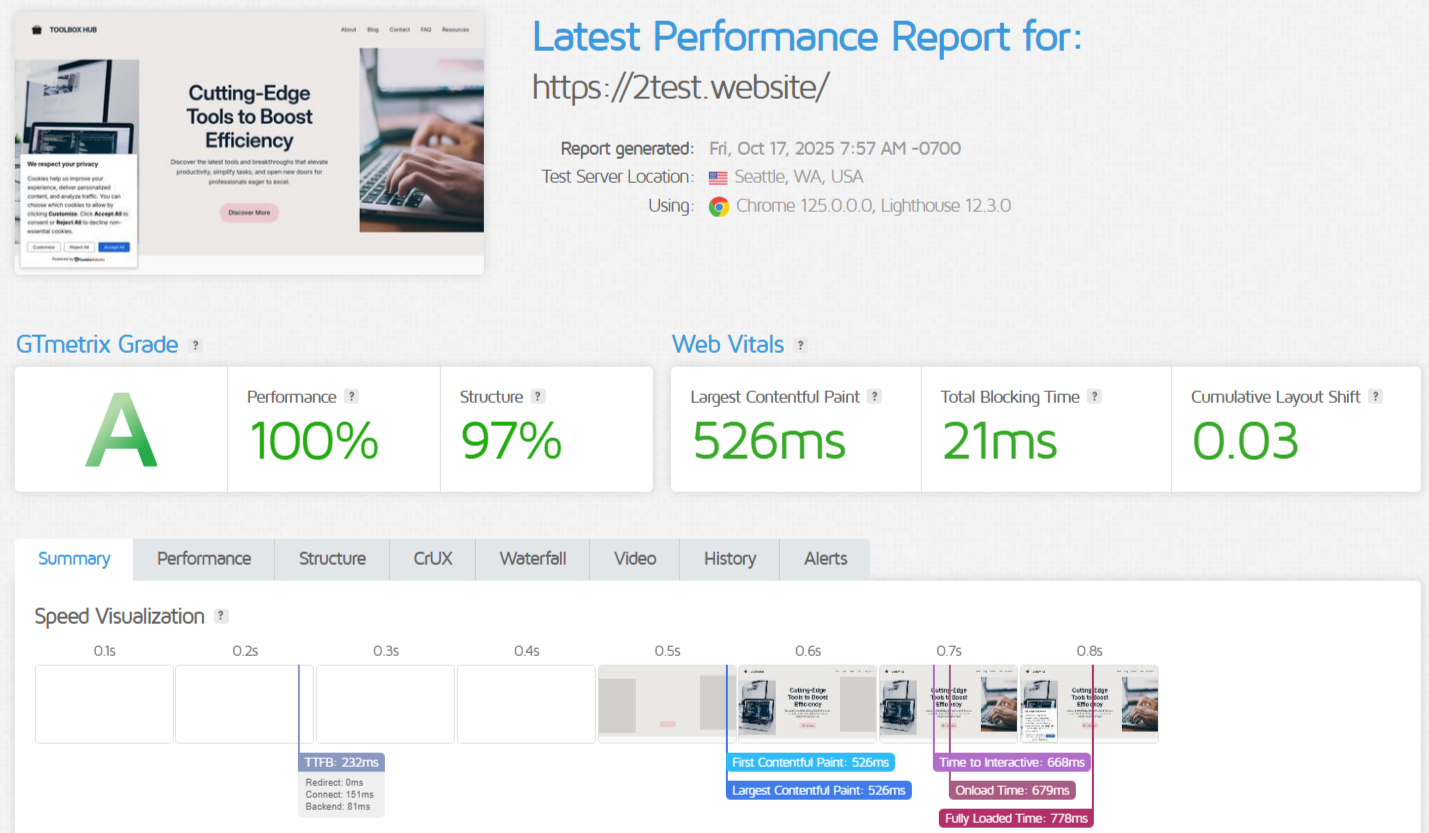
The results genuinely impressed me. Namecheap achieved a 100% Performance grade and 97% Structure grade. This is a score I rarely see, especially on shared hosting.
The Web Vitals metrics were exceptional:
LCP: 526ms – Largest Contentful Paint measures when main content becomes visible. Anything under 2.5 seconds is considered good; at 526 milliseconds, Namecheap delivered primary content nearly five times faster than the “good” threshold. The site loaded almost instantly.
TBT: 21ms – Total Blocking Time of 21ms (good is under 200ms) means the page remained highly responsive during loading. Users could interact with the page, clicking links, filling forms, almost immediately without frustrating delays.
CLS: 0.03 – Cumulative Layout Shift below 0.1 is good; 0.03 indicates extreme stability with minimal unexpected movement. No annoying layout shifts that cause misclicks.
The speed timeline revealed impressive backend performance:
TTFB: 232ms – Time to First Byte measures server response time. At 232ms, the server responded nearly instantly (under 600ms is acceptable).
Breaking this down: 0ms redirect, 151ms connection, and just 81ms backend processing. That 81ms is how long the server took to generate the page, query the database, and process PHP (exceptional for WordPress with multiple plugins).
Time to Interactive: 668ms – The page became fully interactive in 0.67 seconds.
Onload Time: 679ms and Fully Loaded Time: 778ms meant everything finished loading in under 0.8 seconds.
These metrics place Namecheap in the top tier of providers I’ve tested.
From a user perspective, this translates to a website that feels instant; no loading delays, immediate responsiveness, visual stability. These factors directly impact engagement and conversions.
For SEO, these results exceed Google’s Core Web Vitals “good” thresholds by substantial margins, contributing to better search rankings.
Performance can vary significantly based on server load, time of day, and network conditions, so I didn’t want to rely on a single snapshot test.
To get an accurate picture of Namecheap’s consistency and reliability, I conducted daily performance tests over a full week.
Weekly Test Results Summary:
| Metric | Best Result | Worst result | Average | Good Threshold |
|---|---|---|---|---|
| GTmetrix Grade | 99% | 98% | 99% | 90%+ |
| Performance Score | 100% | 100% | 100% | 90%+ |
| Structure Score | 97% | 96% | 97% | 90%+ |
| LCP (ms) | 425 | 608 | 502 | <2500 |
| TTFB (ms) | 158 | 209 | 184 | <600 |
| TBT (ms) | 0 | 62 | 30 | <200 |
| CLS | 0.0008 | 0.0285 | 0.0243 | <0.1 |
| Fully Loaded (ms) | 660 | 903 | 729 | <3000 |
Over seven consecutive days (October 27 – November 2, 2025), Namecheap delivered remarkably consistent performance:
GTmetrix Grades: The site maintained a 99% overall grade for six out of seven days, with one day at 98%. Exceptional consistency that demonstrates reliable server optimization.
Performance Scores: A perfect 100% performance score across all seven days. Not a single drop below this threshold, which is extraordinary for shared hosting where resources fluctuate based on server load.
Structure Scores: Remained at 97% for six days with one day at 96%. A minimal variation indicating stable site optimization and server configuration.
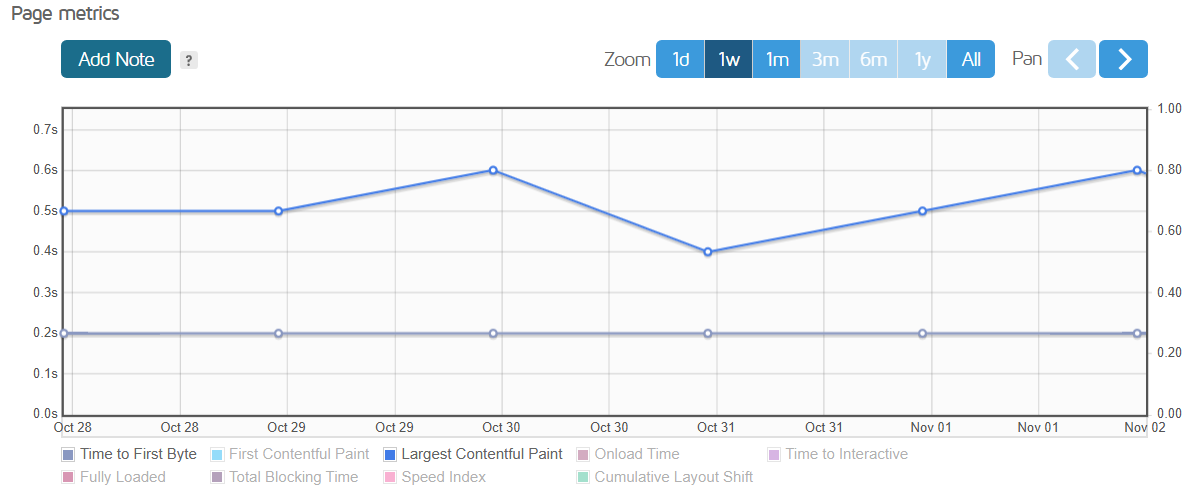
Largest Contentful Paint (LCP): Ranged from 425ms to 608ms across the week, with an average of 502ms. Every single measurement stayed well below the 2.5-second “good” threshold. The fastest day (October 30) delivered LCP at 425ms, while the slowest (November 1) still achieved 608ms. Both excellent results.
Time to First Byte (TTFB): Varied between 158ms and 209ms, averaging 184ms. This consistency in server response time indicates Namecheap’s backend infrastructure handles requests efficiently regardless of when you test. The fastest response (158ms on November 2) and slowest (209ms on October 31) differ by only 51ms. This is negligible in practical terms.
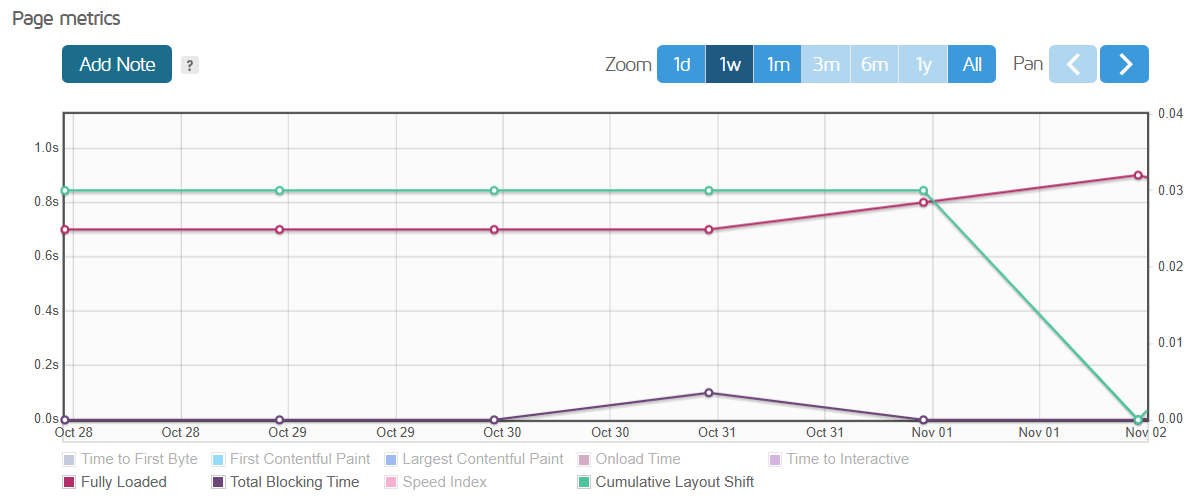
Total Blocking Time (TBT): Fluctuated from 0ms to 62ms throughout the week, with an average of 30ms. All measurements remained far below the 200ms “good” threshold, ensuring visitors could interact with the site immediately.
Cumulative Layout Shift (CLS): Stayed between 0.0008 and 0.0285 across all tests, averaging 0.0243, well below the 0.1 “good” threshold. This exceptional visual stability means users experienced no frustrating layout jumps during page loading.
Fully Loaded Time: Ranged from 660ms to 903ms, averaging 729ms. Even the slowest day (November 1 at 903ms) loaded in under one second. This is faster than most hosting providers achieve on their best day.
Page Size and Requests: Remained consistent at approximately 1.64MB and 34 requests throughout the week, confirming no unexpected resource bloat or optimization degradation over time.
While weekly testing provides valuable insights into short-term consistency, I wanted to understand how Namecheap performs over an extended period.
A month-long evaluation reveals patterns that shorter tests miss: how the hosting handles sustained load, whether performance degrades over time, and how it responds to various server conditions across different weeks.
Monthly Test Results Summary:
| Metric | Best Result | Worst result | Average | good threshold |
|---|---|---|---|---|
| GTmetrix Grade | 99% | 97% | 98% | 90%+ |
| Performance Score | 100% | 99% | 100% | 90%+ |
| Structure Score | 97% | 94% | 96% | 90%+ |
| LCP (ms) | 403 | 815 | 520 | <2500 |
| TTFB (ms) | 125 | 254 | 175 | <600 |
| TBT (ms) | 0 | 99 | 24 | <200 |
| CLS | 0.000053 | 0.0285 | 0.0175 | <0.1 |
| Fully Loaded (ms) | 579 | 1051 | 729 | <3000 |
Detailed Monthly Analysis
GTmetrix Grades: Over 31 days, the site maintained 98-99% grades for 29 days, with only two days dropping to 97%. This represents 93.5% of tests achieving the highest tier performance. A remarkable consistency for shared hosting over an extended period.
Performance Scores: Achieved a perfect 100% on 29 out of 31 days, with only two days at 99%. This 93.5% perfect score rate demonstrates that Namecheap’s optimization remains stable long-term, not just during ideal conditions.
Structure Scores: Ranged from 94% to 97%, with most days clustering around 95-97%. The occasional 94-95% scores (appearing on 7 days) likely reflect minor variations in how GTmetrix evaluates page structure rather than actual performance degradation, as other metrics remained excellent on those same days.
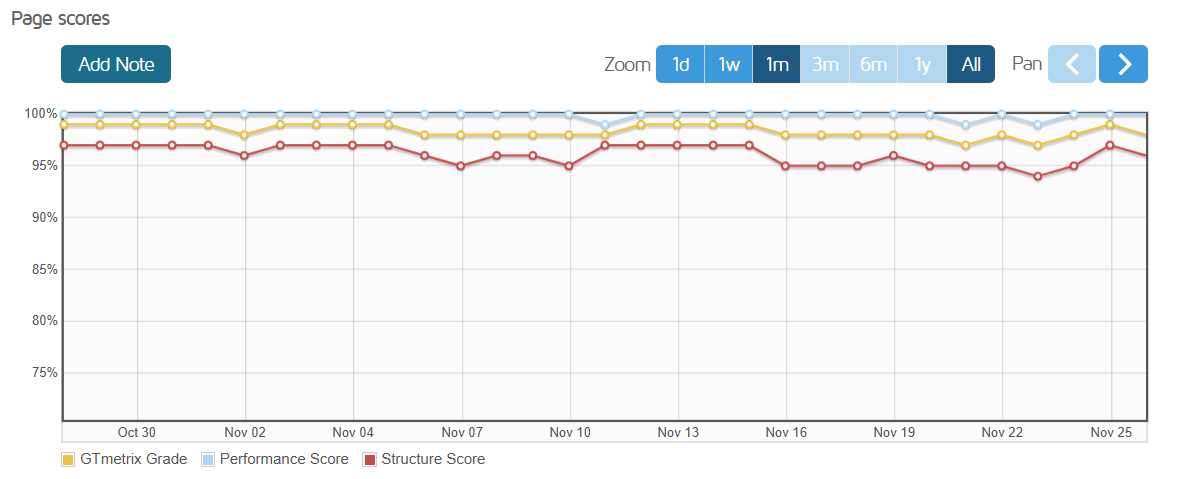
Largest Contentful Paint (LCP): Averaged 520ms across the month. An exceptional performance. The best result (403ms on November 8) and worst result (815ms on November 23) show a 412ms range. While this is larger than the weekly variation, even the slowest day remained 3x faster than the 2.5-second “good” threshold. Notably, 28 out of 31 days stayed under 600ms.
Time to First Byte (TTFB): Averaged just 175ms throughout the month. This is outstanding server response time. The fastest day (125ms on November 13) and slowest day (254ms on November 4) differed by 129ms, yet both remained well under the 600ms acceptable threshold. This consistent sub-200ms average indicates Namecheap’s backend infrastructure maintains efficiency even as server conditions vary.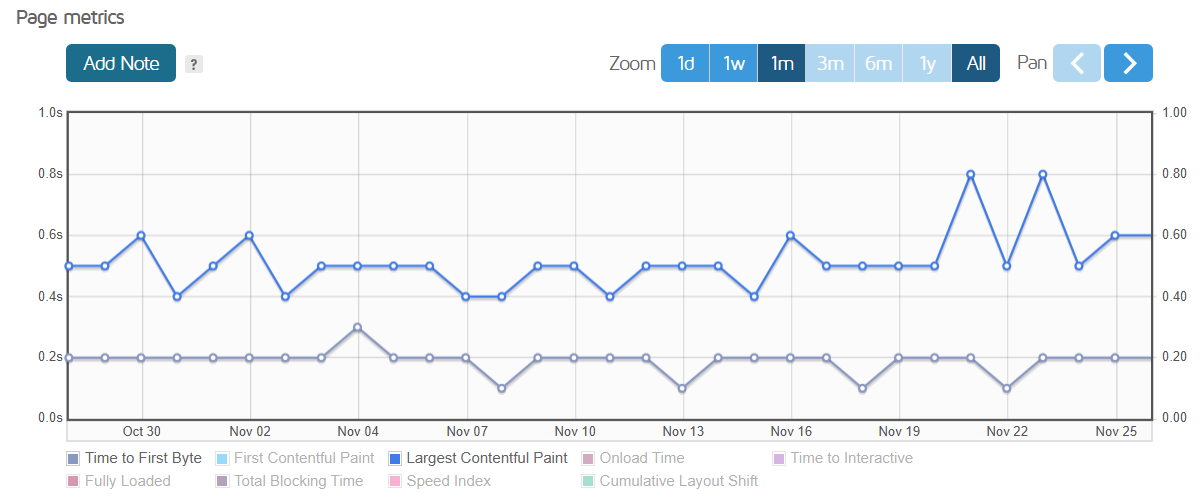
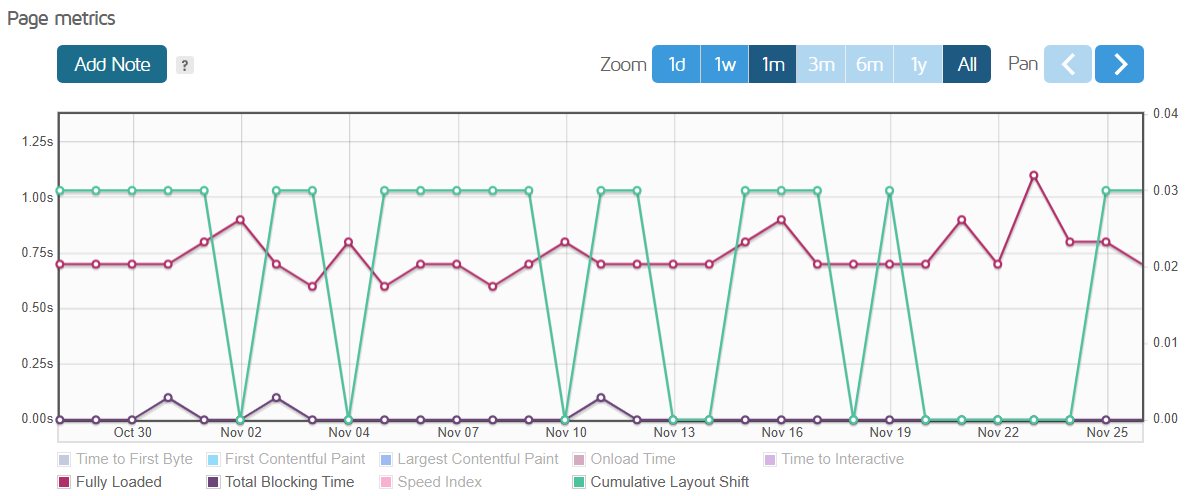
Total Blocking Time (TBT): Averaged 24ms across 31 days, with 11 days achieving 0ms, meaning the page was immediately interactive with zero blocking. The highest measurement (99ms on November 11) still remained well below the 200ms threshold. This exceptional interactivity means users could engage with the site instantly, regardless of when they visited.
Cumulative Layout Shift (CLS): Averaged 0.0175 throughout the month, far below the 0.1 “good” threshold. Visual stability remained consistent, with no day exceeding 0.0285. Users experienced stable, predictable layouts with no frustrating content jumps during page load.
Fully Loaded Time: Averaged 729ms, under three-quarters of a second for complete page loading. The fastest day (579ms on November 8) and slowest day (1051ms on November 23) both represent excellent performance. Even the slowest measurement loaded in just over one second, faster than most competitors achieve on their best days.
Page Size and Requests: Remained remarkably stable at 1.64-1.65MB across 34-35 requests throughout the entire month. This consistency confirms no resource bloat, optimization degradation, or unexpected changes to the site over time.
Analyzing the month-long data reveals several important patterns:
No Performance Degradation: Unlike some hosts where performance deteriorates over time as servers fill up or maintenance is deferred, Namecheap maintained consistent quality from day 1 through day 31.
Minimal Variance: The standard deviation in key metrics remained low. LCP varied by only 412ms between best and worst across 31 measurements.
Outlier Analysis: The two days with slightly lower performance (November 21 and November 23) still delivered acceptable results. GTmetrix grades of 97%, LCP under 820ms, and fully loaded times around 1 second. Even on “off” days, Namecheap exceeded industry standards.
Weekend vs Weekday Performance: Comparing weekend tests (8 days) against weekdays (23 days) showed no significant performance differences. Average LCP was 528ms on weekends versus 517ms on weekdays. Essentially identical. This indicates server resources remain consistent regardless of usage patterns.
I decided to evaluate the ease of use of Namecheap Hosting by focusing on three critical touchpoints:
These elements matter far more than most people realize because they determine whether you’ll spend your time building your website or struggling with your hosting provider. Let me walk you through what I discovered.
I approached Namecheap’s registration wanting to answer a simple question: how many obstacles stand between a complete beginner and a functional hosting account?
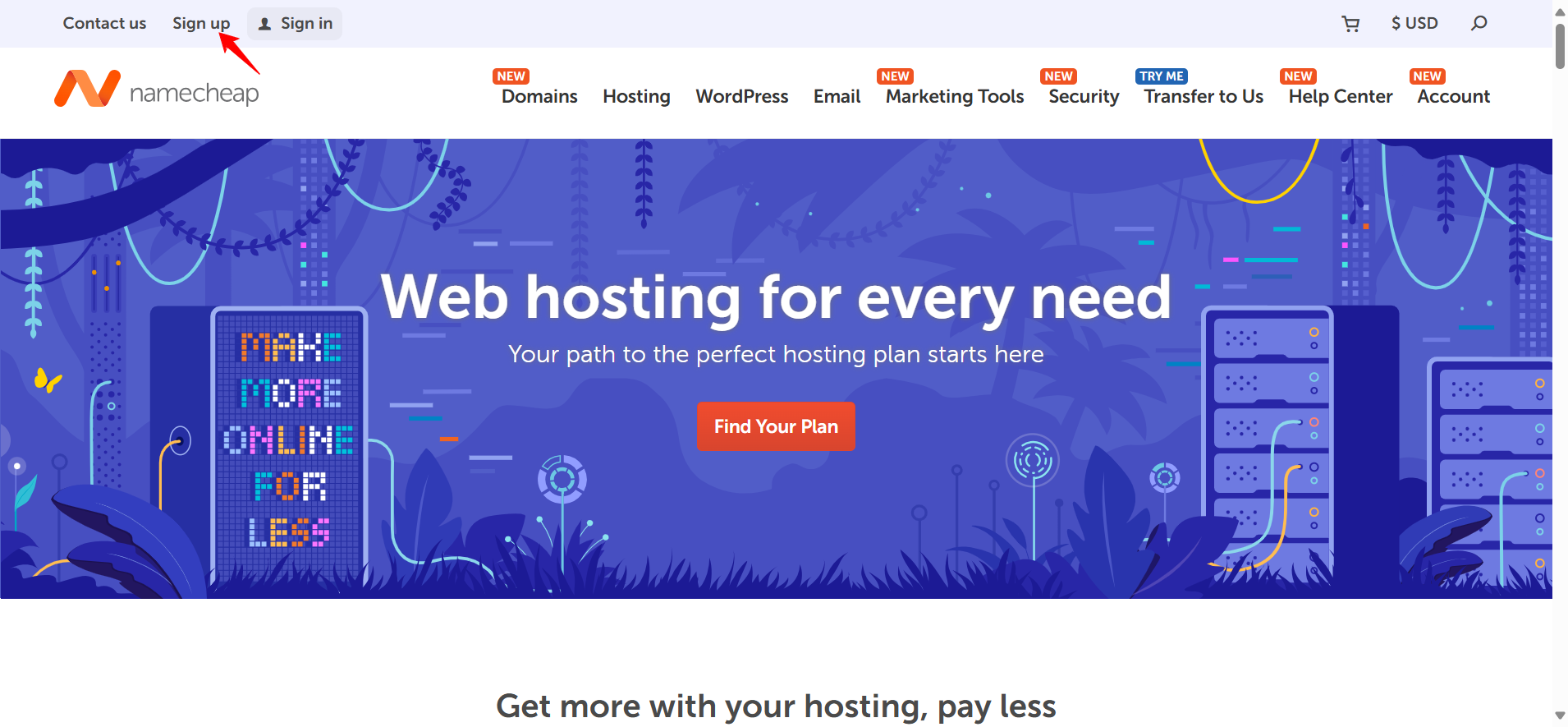
Starting from Namecheap’s homepage, I clicked the “SIGN UP” button in the top-left corner. This opened a clean, focused account creation page that immediately felt different from competitors who bombard you with options.
The form requested just four pieces of information, and I appreciated that each field had a clear purpose.
The username field caught my attention first because Namecheap explicitly notes that this becomes your permanent account identifier.
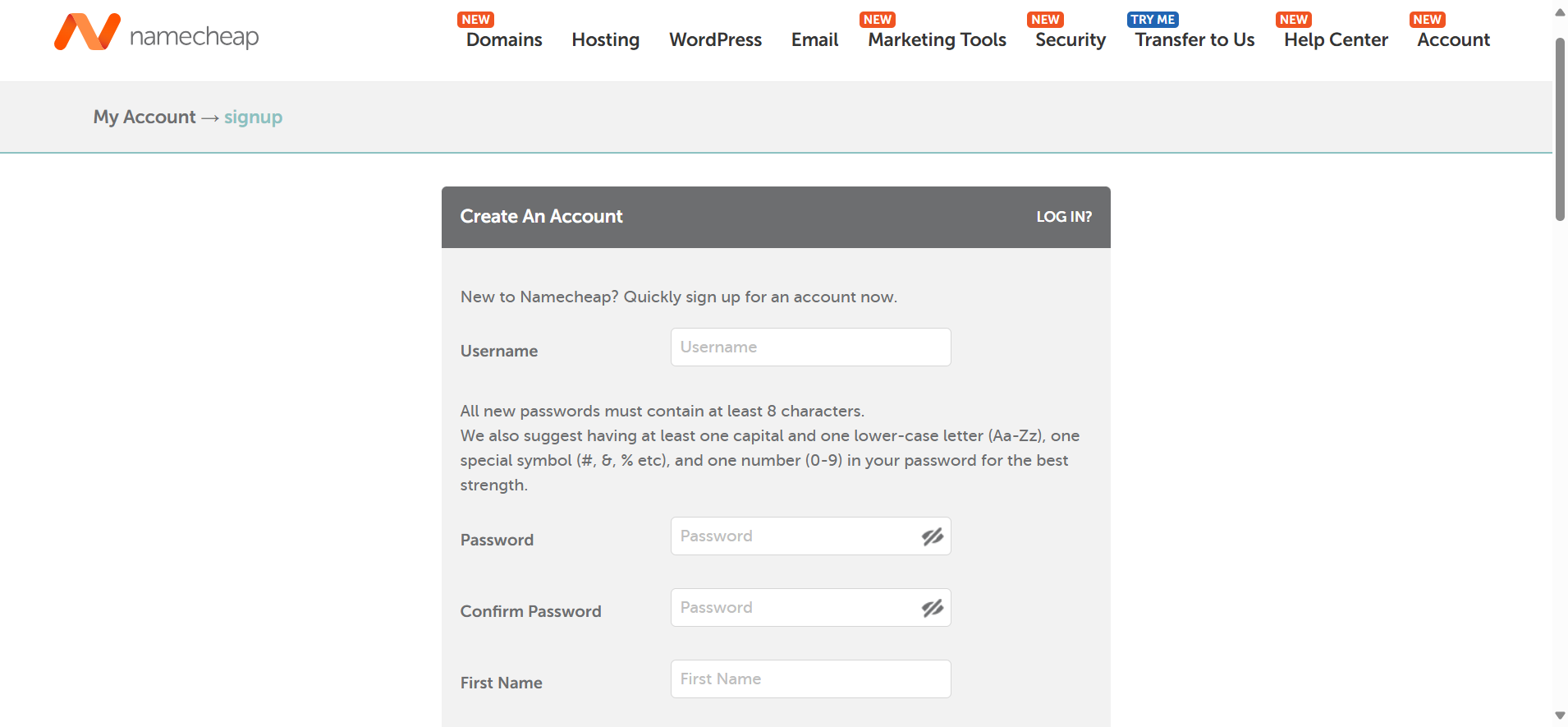
Creating the password was straightforward. They want a strong password, but they’re not prescriptive about it, which respects users’ ability to make reasonable security decisions.
The first and last name fields might seem trivial, but I’ve learned these details matter when you’re dealing with billing issues or need to prove account ownership. Namecheap uses this information for official correspondence and invoices, which adds a level of professionalism I appreciate.
Finally, the email address becomes your primary communication channel for everything important: password resets, order confirmations, security alerts, and service updates. I used a dedicated email for hosting services, which is a practice I recommend for anyone managing multiple online properties.
After reviewing the Terms of Service (which I actually read through, finding them more transparent than most), I clicked “Create Account and Continue.”
Here’s where Namecheap genuinely impressed me: within three seconds, I was looking at my account dashboard. No “check your email for a verification link” holding pattern. No additional security questions. No phone verification. Just immediate access.
The welcome email arrived in my inbox within a minute, but the crucial point is I didn’t need to wait for it. I could start exploring the platform instantly.
Now came the real test: Purchasing Hosting. I navigated to the top menu, hovered over “Hosting,” and selected “Shared Hosting.”
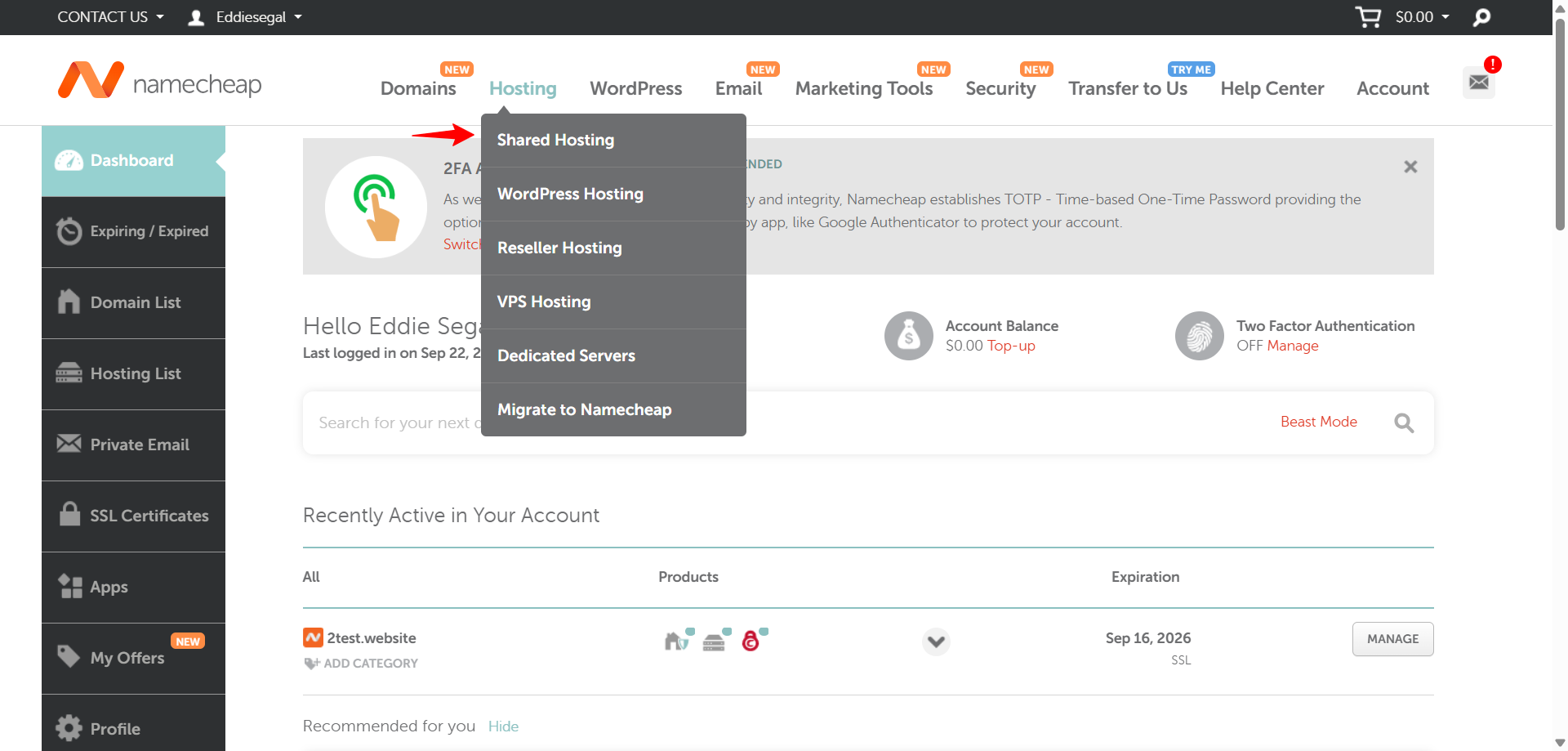
This brought me to a comparison page displaying all three Stellar tiers side by side. The layout was sensible, with clear feature differentiation between plans. I selected the base Stellar plan to evaluate the entry-level experience.
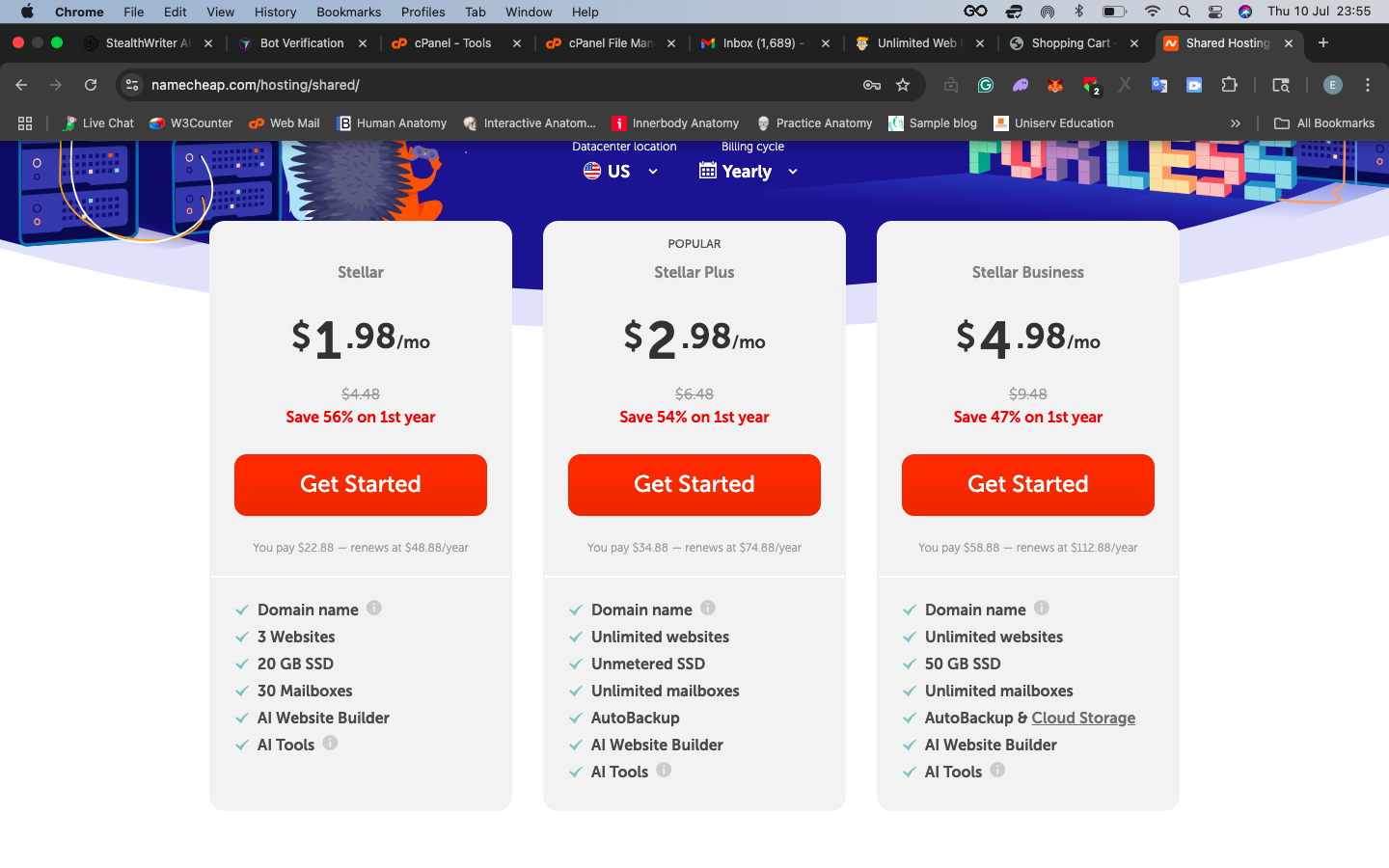
The plan details page deserves specific praise. Instead of vague promises like “blazing fast speeds” or “enterprise-grade performance,” Namecheap listed concrete specifications: 20 GB SSD storage, unmetered bandwidth, support for 3 websites, 30 mailboxes. These are actual, measurable features I can evaluate.
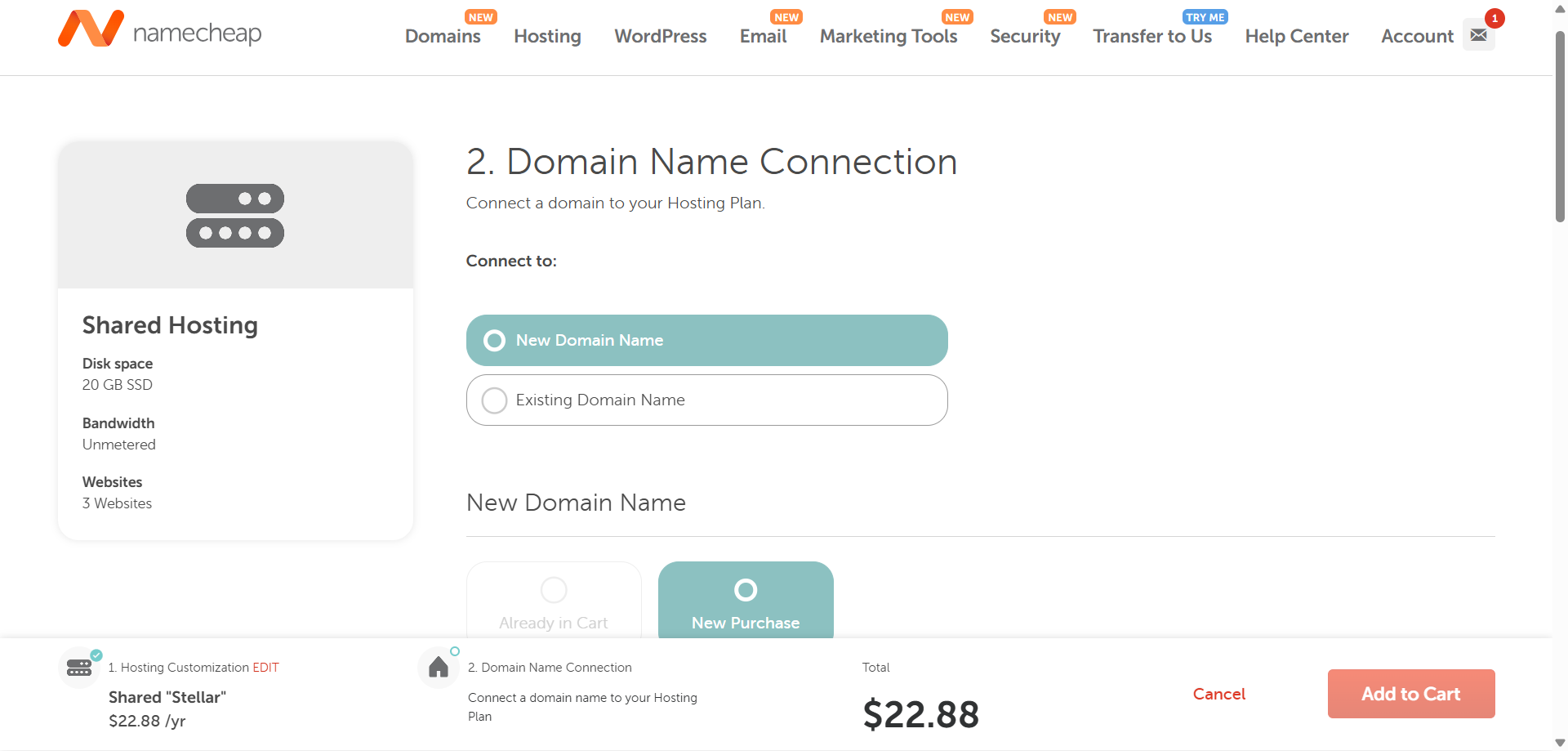
When I clicked “Get Started,” the system asked me to connect a domain, either register a new one or use an existing domain I owned elsewhere.
I chose to register a new domain to test the complete onboarding flow. What I particularly valued was that this didn’t feel like a separate transaction awkwardly bolted onto the hosting purchase. It was integrated into the workflow.
The pricing transparency throughout this process stood out. Before I added anything to my cart, I could see exactly what I’d pay: $22.88 for the first year of Stellar hosting. No asterisks leading to hidden fees. No surprise charges appearing at checkout. The final cart matched what I expected.
After completing registration, I landed in Namecheap’s dashboard, and this is where my experience truly began to take shape.
I’ve tested countless hosting dashboards, and they typically fall into two traps:
Namecheap avoids both extremes.
The interface greeted me with a personalized “Hello [Your Name]” message showing my last login timestamp. It’s a simple security awareness feature that many hosts overlook.
The layout uses a clean left sidebar, giving instant access to all major sections:
The logical grouping impressed me. No hunting through nested menus or trying to remember where features live.
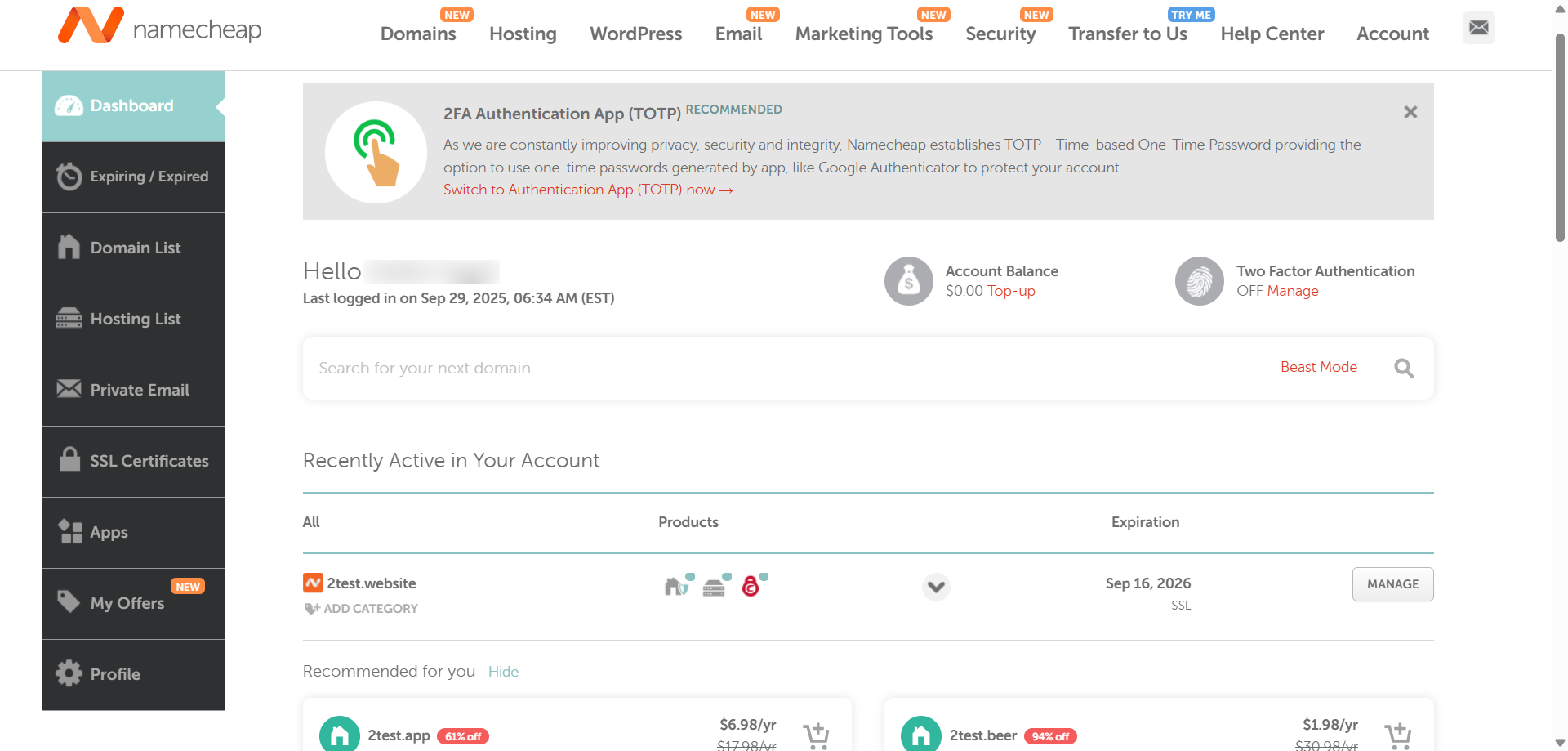
What immediately caught my attention was the “Two – Factor Authentication” status indicator displayed prominently on the main screen, showing “OFF” with a direct “Manage” link. Many hosts bury 2FA settings deep in account preferences, but Namecheap puts it front and center.
The “Recently Active in Your Account” section provided a snapshot of my services with everything I needed at a glance.
For my test domain, I could see:
This eliminated the “where do I go to do X?” problem that plagues many hosting dashboards.
My account balance displayed prominently with a one-click “Top-up” option, and a domain search bar sat ready for immediate use. These placements anticipate user needs rather than making you navigate to separate pages for common tasks.
The sidebar’s “Expiring/Expired” section proved invaluable for tracking services approaching renewal. I’ve seen too many users accidentally let critical services expire because providers don’t surface this information prominently enough. Namecheap makes it impossible to miss.
Finally, I needed to evaluate the most critical aspect: how easy is it to manage hosting after setup?
Day-to-day tasks like creating email accounts, managing databases, and installing SSL certificates determine whether you’ll feel empowered or frustrated as a website owner.
From the main dashboard, I navigated to my domain and accessed the hosting management page by clicking “Manage”. This page provided a valuable high-level overview showing my service status (Active), validity period, and auto-renewal settings.
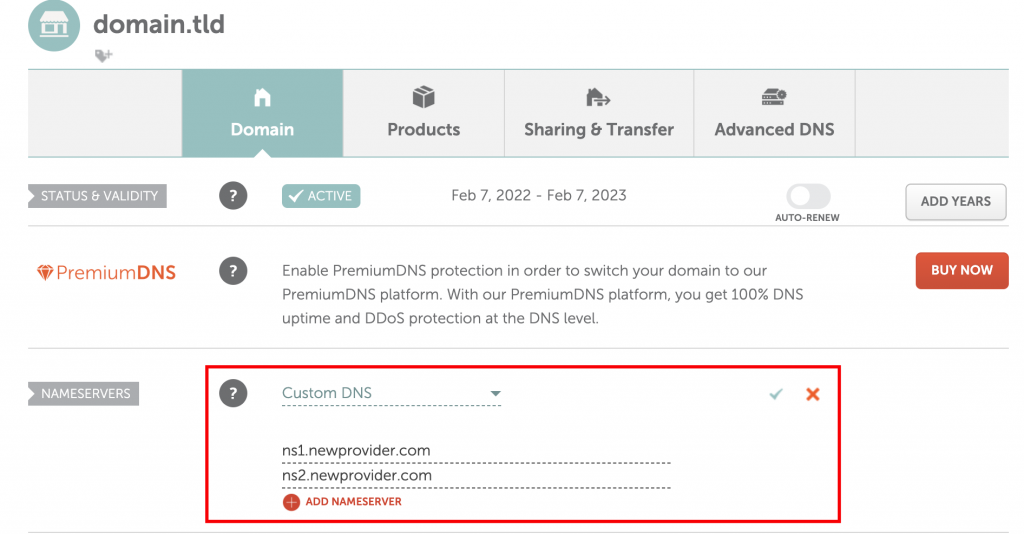
What immediately caught my attention was a prominent banner reminding me to point my domain to the correct nameservers. Namecheap puts this information front and center, where it’s impossible to overlook—preventing common setup failures.
The page displayed my plan specifications at a glance: 20 GB disk space, unmetered bandwidth, support for 3 domains, plus server hostname, IP address, and datacenter location.
A usage statistics section showed current resource consumption—storage, bandwidth, CPU, memory—for quick health checks, with a link to detailed analytics in cPanel.
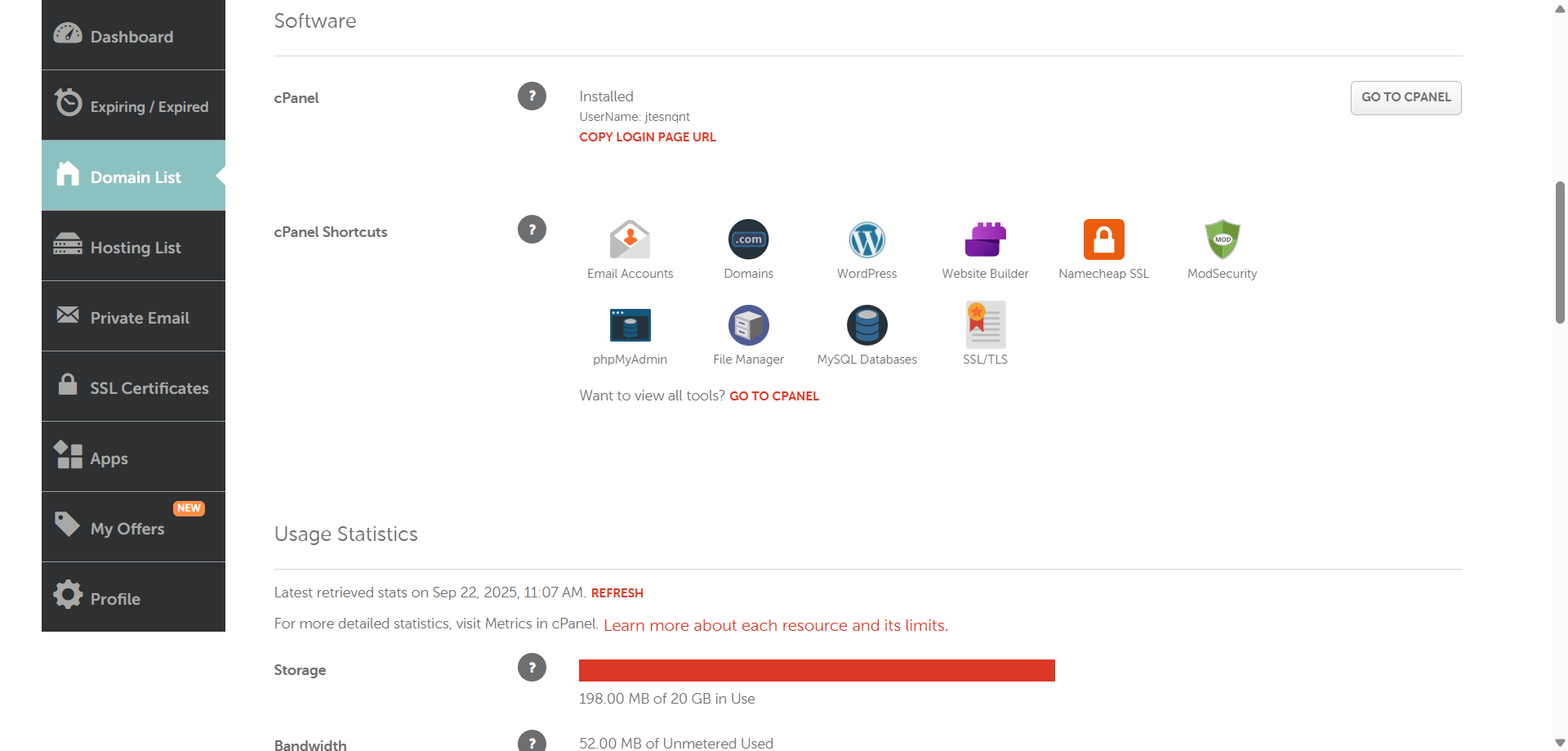
Here’s where Namecheap truly excels: seamless cPanel integration. The “GO TO CPANEL” button logged me directly into the control panel without requiring separate credentials.

Inside cPanel, I had comprehensive control organized into clear categories:
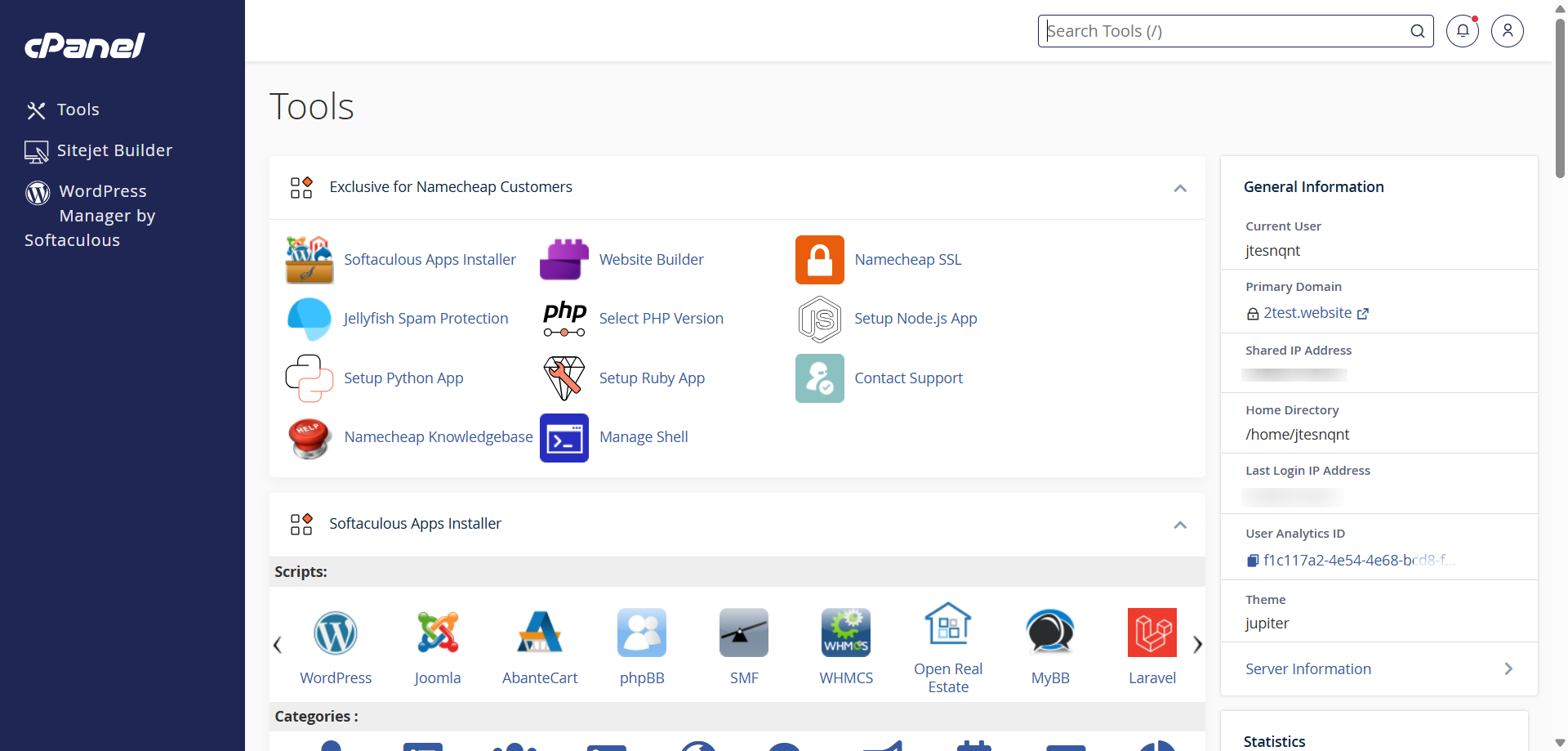
After testing Namecheap from registration through daily management, I’m impressed by how well they’ve balanced simplicity with power. From my experience, here are things I can say about NameCheap:
Customer support often separates good hosting providers from great ones. You can have the fastest servers and most features, but when something breaks at 2 AM, or you’re stuck on a configuration issue, responsive support becomes your lifeline.
Namecheap offers several support methods:
I decided to test these channels systematically to evaluate both response times and answer quality.
I started with live chat (Namecheap’s primary support channel) by clicking the chat bubble in the bottom right corner of their website.
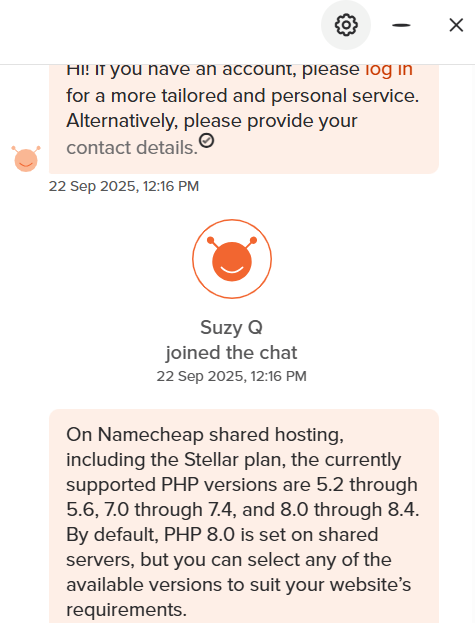
I wanted to test both the AI system and human agent capability, so I asked a technical question: “Which PHP versions are supported on the Stellar plan, and how can I switch between them?”
Within seconds, an AI bot named Suzy Q appeared and provided a surprisingly comprehensive answer. She listed all supported PHP versions (5.6, 7.0-7.4, 8.0-8.4) and gave me step-by-step cPanel instructions for switching between them. The response was accurate and detailed enough that many users wouldn’t need further assistance.
However, I wanted to test human agent availability, so I typed, “Thanks, but I’d like to confirm this with a live support agent.”
In less than a minute, Sviatoslav H. joined the chat. This quick handoff impressed me. No lengthy queue, no being told to submit a ticket instead.
He immediately confirmed the PHP versions, walked me through the exact cPanel location for switching them (Select PHP Version under Software), and maintained a courteous, professional tone throughout.
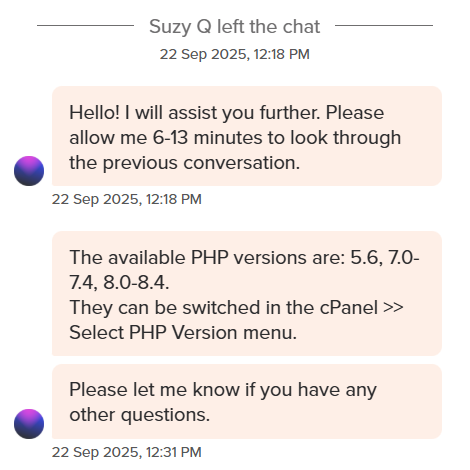
To push the support quality further, I asked a more technical question: “How to set up a cron job for running a daily WordPress backup script?” Rather than giving a rushed generic answer, Sviatoslav took time to understand my specific needs, then linked me directly to a relevant guide in Namecheap’s knowledge base.
This approach showed good judgment. He provided immediate guidance while directing me to comprehensive documentation for deeper understanding.
The chat session remained stable for approximately 20 minutes before timing out due to inactivity on my end. Throughout the interaction, responses came quickly (typically 30-60 seconds between messages), and the agent clearly understood both the technical concepts and how to explain them accessibly.
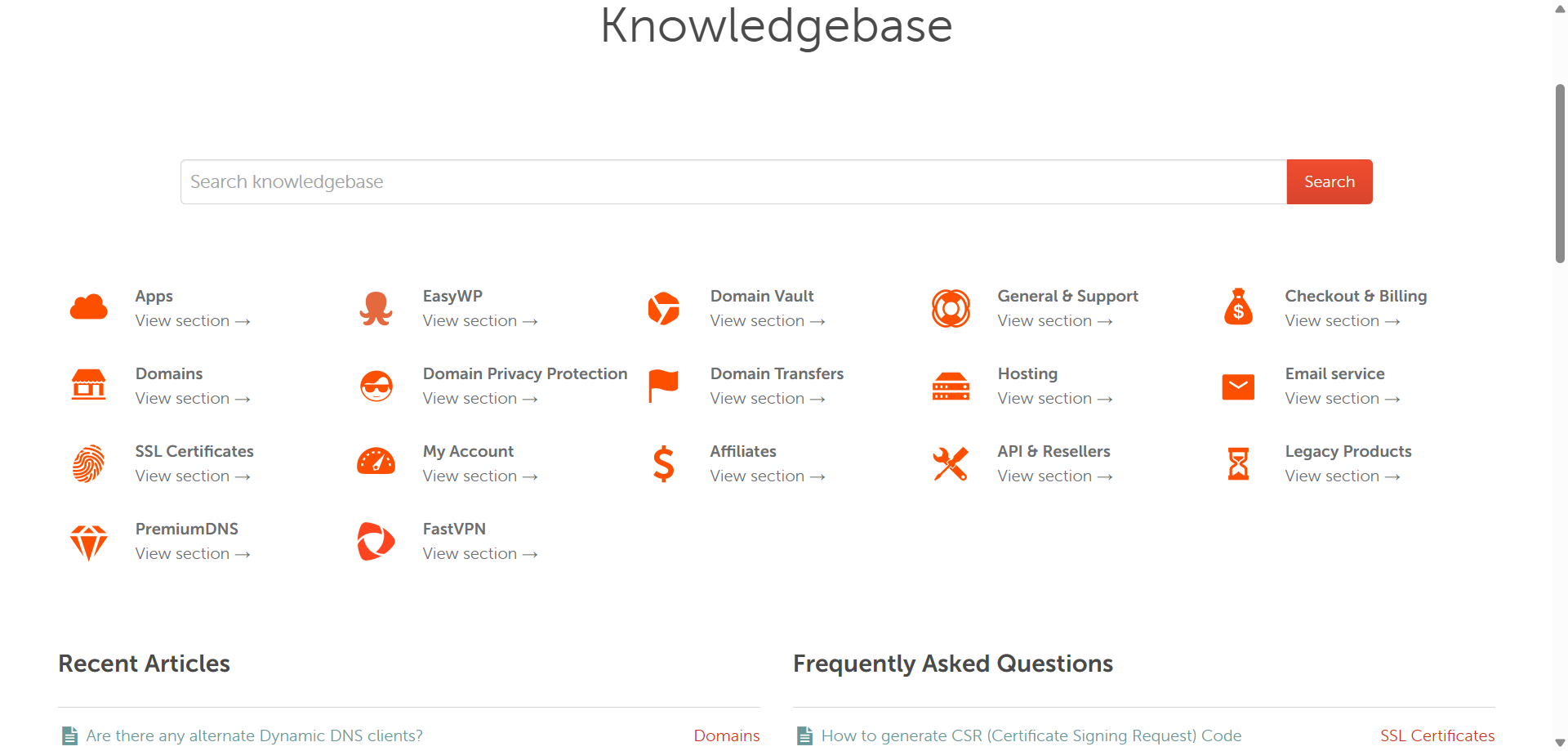
Beyond direct support, I explored Namecheap’s knowledge base, which proved impressively comprehensive. The interface organizes documentation into clear categories: Apps, EasyWP, Domain Vault, General & Support, Checkout & Billing, etc.
Each section contains detailed articles covering common tasks and troubleshooting.
I tested the “search functionality” by looking up “WordPress installation” and found multiple relevant articles with screenshots and step-by-step instructions. The documentation quality exceeded typical hosting provider standards.
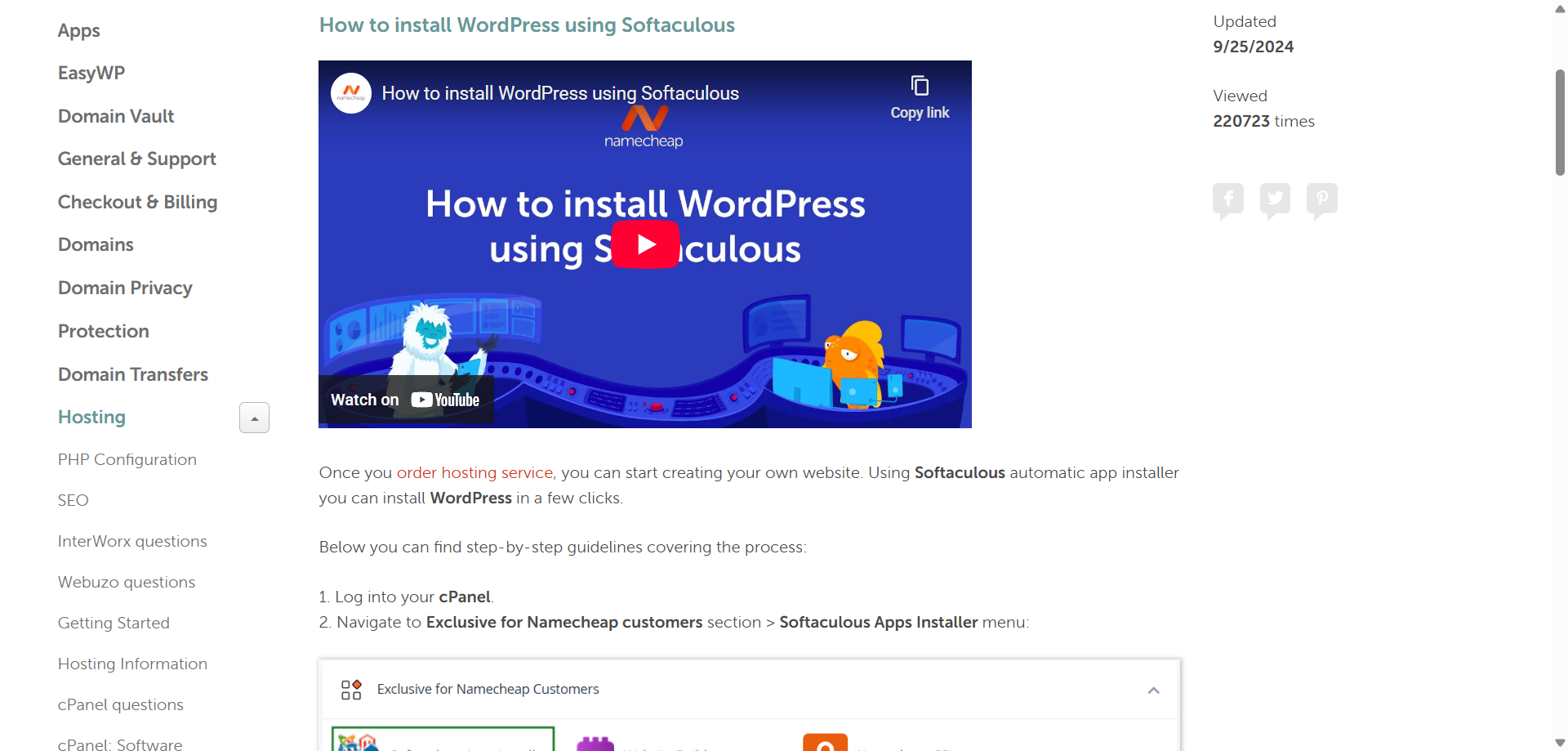
Namecheap also provides “Guru Guides” and “video tutorials” for visual learners. During my testing, I watched several videos covering cPanel basics and domain configuration. The production quality was professional, and the pacing worked well for following along.
The knowledge base includes a “Recent Articles” section highlighting newly added or updated documentation, plus a “Frequently Asked Questions” area addressing common concerns.

It’s worth noting that Namecheap doesn’t offer phone support. For some users, particularly those less comfortable with written communication or facing complex technical issues, this could be a drawback.
However, in my experience, the live chat effectively filled this gap. The real-time nature of chat provides similar immediacy to phone support, and the ability to share links, screenshots, and code snippets actually makes it more useful for technical troubleshooting.
Yes, I confidently recommend Namecheap, and here is why:
However, there’s a catch (though minimal):
For most users, these limitations are far outweighed by the transparent pricing, robust feature set, exceptional performance, and user-friendly management.
| Plan Name | Space | Bandwidth | OS | Panel | Number of Sites | Price | |
|---|---|---|---|---|---|---|---|
| Free Trial | Unlimited | Unlimited | Unlimited | MYR 0.00 | Details | ||
| Stellar | 20 GB | Unlimited | cPanel | 3 | MYR 8.09 | Details | |
| Stellar Plus | Unlimited | Unlimited | cPanel | Unlimited | MYR 12.17 | Details | |
| Stellar Business | 50 GB | Unlimited | cPanel | Unlimited | MYR 20.34 | Details |
| Plan Name | Space | CPU | RAM | OS | Price | |
|---|---|---|---|---|---|---|
| Free Trial | Unlimited | 1 x 1GHz | MYR 0.00 | Details | ||
| Spark | 20 GB | 1 core | 1 GB | MYR 15.85 | Details | |
| Pulsar | 40 GB | 2 cores | 2 GB | MYR 28.11 | Details | |
| Quasar | 120 GB | 4 cores | 6 GB | MYR 52.62 | Details | |
| Magnetar | 240 GB | 8 cores | 12 GB | MYR 101.64 | Details | |
| Hypernova | 500 GB | 12 cores | 24 GB | MYR 191.51 | Details |
| Plan Name | Space | CPU | RAM | OS | Price | |
|---|---|---|---|---|---|---|
| Xeon E-2236 | 480 GB | 6 x 3.4GHz | 32 GB | MYR 152.50 | Details | |
| Xeon E-2234 | 480 GB | 4 x 3.4GHz | 16 GB | MYR 169.65 | Details | |
| Xeon E3-1230 v5 | 6 TB | 4 x 3.4GHz | 32 GB | MYR 193.67 | Details | |
| Dual Xeon Silver 4208 | 2 TB | 8 x 2.1GHz | 64 GB | MYR 588.91 | Details | |
| Dual Xeon Gold 5218 | 1 TB | 16 x 2.3GHz | 128 GB | MYR 656.23 | Details |
| Plan Name | Space | Bandwidth | OS | Panel | Price | |
|---|---|---|---|---|---|---|
| Free Plan | Unlimited | Unlimited | MYR 0.00 | Details | ||
| Nebula | 30 GB | Unlimited | cPanel | MYR 81.21 | Details | |
| Galaxy Expert | 90 GB | Unlimited | cPanel | MYR 162.91 | Details | |
| Universe Pro | 150 GB | Unlimited | cPanel | MYR 240.53 | Details |
| Plan Name | Space | Bandwidth | Panel | Warranty | Number of Sites | Price | |
|---|---|---|---|---|---|---|---|
| .COM price for 1 year | Unlimited | Unlimited | MYR 0.00 | Unlimited | MYR 27.74 | Details | |
| .ORG price for 1 year | Unlimited | Unlimited | MYR 0.00 | Unlimited | MYR 34.64 | Details | |
| .NET price for 1 year | Unlimited | Unlimited | MYR 0.00 | Unlimited | MYR 50.98 | Details |
| Plan Name | Space | CPU | RAM | Warranty | Price | |
|---|---|---|---|---|---|---|
| EasyWP Starter | 10 GB | - | MYR 0.00 | MYR 40.36 | Details | |
| EasyWP Turbo | 50 GB | - | MYR 0.00 | MYR 56.70 | Details | |
| EasyWP Supersonic | 100 GB | - | MYR 0.00 | MYR 85.30 | Details |
| Plan Name | CPU | RAM | Bandwidth | Warranty | Price | |
|---|---|---|---|---|---|---|
| EasyWP Starter | - | Unlimited | MYR 0.00 | MYR 40.36 | Details | |
| EasyWP Turbo | - | Unlimited | MYR 0.00 | MYR 56.70 | Details | |
| EasyWP Supersonic | - | Unlimited | MYR 0.00 | MYR 85.30 | Details |


Yes, Namecheap is excellent for hosting. In my testing, their shared hosting achieved a perfect 100% GTmetrix performance score with 526ms load times, which rivals providers charging significantly more. They offer reliable uptime, comprehensive features including free SSL and cPanel access, and transparent pricing without hidden fees.
Namecheap hosting is exceptionally fast. My WordPress test site achieved 232ms Time to First Byte (TTFB), 526ms Largest Contentful Paint, and fully loaded in under 0.8 seconds—significantly faster than most shared hosting providers. These results exceed Google’s Core Web Vitals “good” thresholds by substantial margins. The pure SSD storage, optimized server configurations, and effective caching contribute to this impressive speed even on their entry-level Stellar plan.
Yes, Namecheap includes cPanel with all shared hosting, reseller hosting, VPS, and dedicated server plans at no additional cost. The integration is seamless with single-sign-on access directly from your Namecheap dashboard, eliminating the need to manage separate login credentials.
Namecheap shared hosting starts at $1.98/month (billed annually at $22.88 for the first year) for the Stellar plan, which includes 20GB SSD storage and support for 3 websites. The Stellar Plus plan costs $2.98/month initially ($34.88/year) with unlimited websites and unmetered storage. Stellar Business is $4.98/month ($58.88/year) and includes Imunify360 security.
Based on my testing, Namecheap offers better value than both Bluehost and GoDaddy. Namecheap’s introductory pricing ($1.98/month) is significantly lower than Bluehost ($4.95/month) and GoDaddy ($6.99/month), while performance metrics matched or exceeded both competitors.

Answer a few simple questions and find the perfect solution for you!
Start Hosting Search