


Choosing the right RDP server hosting can save you hours of frustration because it’s not just about finding the lowest price. Performance, Windows compatibility, server locations, and management options all affect your remote desktop experience. We compared the four best RDP hosting providers to help you find the right solution for your workload and budget.
When comparing RDP hosting providers, consider factors such as CPU and RAM resources, storage performance, server locations, security features, and whether you need a managed or self-managed solution. The best choice depends on how you plan to use your server, whether for remote work, business applications, software testing, development, or other legitimate always-on workloads.
4 Best RDP Server Hosting Providers You Can Rely On
| Provider | User Rating | Money-Back Guarantee | |
|---|---|---|---|
 | 4.8 | 30 Day Free Trial + $100 Credit | Visit Kamatera |
 | 4.9 | 30 Day Free Trial | Visit Ultahost |
 | 4.4 | 30 Days | Visit IONOS |
 | 4.8 | 45 Days | Visit Verpex |
What Is RDP Server Hosting?
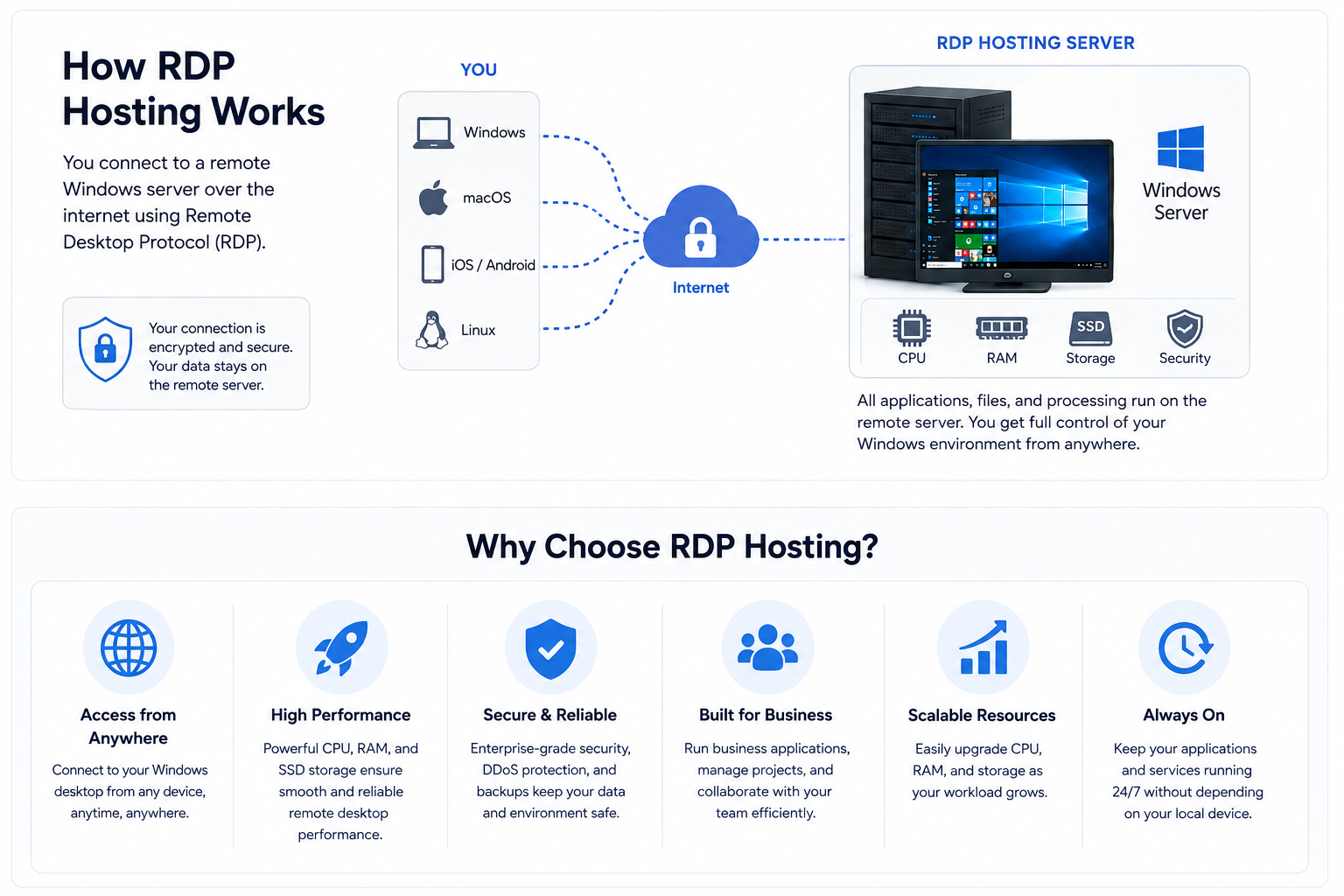
RDP server hosting is a Windows VPS or dedicated server configured for Remote Desktop Protocol (RDP) access. Instead of installing and running applications on your local computer, you connect to a remote Windows desktop over the internet using Microsoft Remote Desktop or any other compatible RDP client.
Once connected, your applications, files, and processing run on the hosted server, while your own computer displays the remote desktop and forwards your keyboard and mouse input. This allows you to access the same Windows environment from almost anywhere, while applications and workloads running on the server can continue operating even when your personal device is turned off.
RDP hosting is commonly used for remote work, business applications, software development, testing environments, and remote team administration where a secure, always-available Windows server is beneficial.
RDP Hosting vs. Windows VPS Hosting
The terms RDP hosting and Windows VPS hosting are often used interchangeably, but they don’t always describe the same type of service.
A Windows VPS is a virtual private server running Microsoft Windows, giving you full administrative control over the operating system and installed applications.
RDP hosting typically refers to a Windows VPS or dedicated server that is already configured for access using Microsoft’s Remote Desktop Protocol (RDP), making it easy to connect to and use a remote Windows desktop.
If you need maximum flexibility, look for a Windows VPS with full administrative access. If you prefer a ready-to-use environment with RDP already configured, a preconfigured RDP hosting solution may be more convenient.
Quick Look: The Top 4 RDP Hosting Providers
To save you time, we’ve compared the top performers on the market based on the key qualities that matter most for RDP hosting:
| Provider | Uptime | Features | Price Starting at |
| 99.95% | Windows Server support Custom CPU, RAM & storage NVMe SSD storage Up to 104 vCPUs & 512 GB RAM Global data centers Optional managed services | $4.00/month |
| 99.99% | Windows Server support Dedicated CPU & RAM RAID 10 NVMe SSD storage Free daily backups BitNinja security protection 24/7 technical support | $12.70/month |
| 99.99% | Windows Server 2022 & 2025 Scalable VPS resources NVMe SSD storage Unlimited traffic Full root access DDoS protection Data centers in multiple locations 24/7 expert support | $2.00/month |
| 99.90% | Windows Server support Dedicated CPU resources NVMe SSD storage Unlimited bandwidth DDoS protection 24/7 customer support Daily backup | $2.99/month |
The right RDP hosting provider depends on your specific needs, whether you prioritize flexibility, managed support, predictable pricing, or simple setup. The comparison below highlights which provider is the best fit for common RDP hosting use cases:
| Use Case | Provider | Why It Stands Out |
| Flexible cloud configurations | Kamatera | Highly customizable cloud servers with flexible resource scaling. |
| Managed Windows RDP hosting | Ultahost | Managed solutions with user-friendly setup and support options. |
| Predictable business pricing | IONOS | Reliable infrastructure with straightforward plans for business users. |
| Simple Windows VPS setup | Verpex | Quick onboarding and easy-to-manage Windows VPS options |
What To Look For In A Remote Hosting Provider?
Choosing the right RDP hosting provider starts with understanding your own requirements. We evaluated providers based on the factors that have the biggest impact on everyday usability, reliability, security, and long-term value. Before making your decision, consider the following:
- Know What You’ll Use the Server For: Start by identifying your primary use case, whether it’s remote work, business applications, software development, testing environments, or supporting multiple users. Your workload will determine how much CPU, RAM, storage, and bandwidth you actually need.
- Check Windows Compatibility: Verify that the provider supports the Windows Server version your applications require and offers reliable RDP access. Also check whether the Windows license is included in the plan price to avoid unexpected costs.
- Compare Hardware and Performance: Look at the available CPU cores, RAM, and SSD or NVMe storage instead of focusing solely on price. Balanced resources help deliver a smoother, more responsive Remote Desktop experience and leave room for future growth.
- Verify Administrator Access: If you need to install software, change system settings, or manage security configurations, make sure your plan includes full administrator access rather than a restricted user account.
- Check Reliability and Scalability: Look for providers with stable infrastructure and strong uptime records to minimize interruptions. Also consider how easily you can upgrade CPU, memory, storage, or bandwidth as your requirements grow without having to migrate to a new server.
- Pick the Right Data Center Location: Select a server located close to where you or your users will connect. Providers with multiple data center locations give you more flexibility and can help reduce latency and improve connection quality.
- Review Security and Backup Options: Look for features such as firewalls, DDoS protection, automatic backups, and secure or encrypted remote connections to help protect your server and data from common threats.
- Understand Pricing and Support: Compare the total cost of the service, including renewal pricing, Windows licensing, backups, upgrades, and other additional fees. Also consider customer support and the overall balance between features, performance, reliability, and long-term value rather than price alone.
The 4 Best RDP Server Hosting Providers
Enough about the definitions. Let’s see what the market has to offer.
Here’s a list of the best remote desktop hosting providers.
1. Kamatera
Best for: Customizable Cloud RDP Hosting

Why it works for RDP hosting:
Kamatera is a strong choice for users who need a flexible Windows RDP environment that can be adjusted as requirements change. Its cloud infrastructure lets you customize CPU, RAM, storage, and other resources to match your workload instead of being limited to fixed VPS configurations. This makes it suitable for businesses, developers, and users who need scalable remote desktops.
Key RDP features:
- Windows Server with RDP access
- Custom configurations with up to 104 vCPUs and 512GB RAM
- SSD storage and high-speed networking
- Optional managed cloud services
- Backups, monitoring, firewalls, and VPN options
- 24/7 technical support
Watch out for:
Kamatera’s flexibility can make pricing less predictable compared with fixed VPS plans. Users who need a simple, fully managed RDP server may find the platform requires more configuration.
Choose it if:
You need a highly customizable RDP hosting provider and want full control over server resources.
Curious about Kamatera? Our Kamatera review covers everything you need to know.

Kamatera: Best Cloud RDP Hosting
2. Ultahost
Best for: High-Performance Windows RDP Hosting

Why it works for RDP hosting:
Ultahost provides managed Windows VPS hosting with full RDP access, making it easier for users who want a ready-to-use remote desktop environment. Its managed Windows VPS plans combine dedicated resources, NVMe storage, security tools, and managed support at competitive prices.
Key RDP features:
- Windows Server with RDP access
- Plans from 2 CPU cores, 2GB RAM, and 50GB NVMe SSD
- RAID-10 NVMe storage
- Free daily backups
- Security features, including BitNinja and firewalls
- 24/7/365 managed support
Watch out for:
The lower-tier plans are suitable for basic workloads but may require upgrades for demanding applications. Some features are included as add-ons depending on the configuration.
Choose it if:
You want a balanced Windows RDP hosting provider with strong performance and managed assistance.
Get the full breakdown in our Ultahost review — performance, pricing, and more.
Ultahost: Best RDP Hosting for Performance
3. IONOS
Best for: Business-Grade Remote Desktop Hosting

Why it works for RDP hosting:
IONOS offers reliable Windows VPS infrastructure with strong scalability options for businesses and professional users. Its Windows VPS solutions support multiple Windows Server versions and provide enterprise-focused features such as private networking, snapshots, and security controls.
Key RDP features:
- Windows Server 2022 & 2025
- Scalable VPS configurations
- Full root access
- Unlimited traffic
- NVMe SSD storage
- DDoS protection and firewall management
- Data centers in multiple regions
- 24/7 expert support
Watch out for:
Entry-level VPS plans have limited resources, and some tools, such as Plesk, require additional payment. Users looking for a beginner-friendly managed RDP solution may need more technical knowledge.
Choose it if:
You need reliable business RDP hosting with scalability and infrastructure-focused features.
See what else sets it apart in our in-depth IONOS review.

IONOS: Best for Scalability
4. Verpex Hosting
Best for: Simple Windows RDP Hosting Setup

Why it works for RDP hosting:
Verpex focuses on providing straightforward Windows VPS hosting with dedicated resources and a simple setup process. Its plans are suitable for users who want a reliable remote desktop environment without dealing with complex cloud configurations.
Key RDP features:
- Windows Server with RDP access
- NVMe SSD storage
- Plans up to 8 dedicated CPUs and 16GB RAM
- Unlimited bandwidth
- DDoS protection and firewall options
- Daily backup
- Global data centers
- 24/7 support
Watch out for:
Verpex offers fewer advanced customization options compared with large cloud infrastructure providers. Users with highly specific resource requirements may need a more flexible platform.
Choose it if:
You want a simple, affordable RDP hosting provider for everyday business workloads.
Not sure if it’s right for you? Our Verpex Hosting review will help you decide.

Verpex: Best RDP Hosting with Fast Setup
Why Use Remote Desktop Hosting?

Here’s a list of the top three reasons why you might choose RDP hosting over a local PC:
1. Integration Across Different Platforms
RDP hosting allows users to access the same Windows desktop environment from different devices, making it easier to work remotely and stay productive. Employees can connect from laptops, desktops, or other devices while keeping access to the same applications, files, and settings.
This flexibility is especially useful for distributed teams and businesses that need a consistent workspace across locations. Instead of installing and maintaining software on every individual computer, companies can provide centralized access through a secure remote desktop environment.
2. Low Risk and Costs
RDP hosting provides a flexible, pay-as-you-go solution that reduces the need for large upfront hardware investments and the risks associated with maintaining physical infrastructure. Instead of purchasing and maintaining expensive machines for every user, companies can choose a server configuration that fits their current workload and scale resources as their requirements change.
This approach helps businesses maintain predictable costs while avoiding the expense and complexity of managing physical infrastructure. With the ability to add users, upgrade resources, or adjust plans when needed, RDP hosting provides a practical way to support growth without unnecessary hardware investments.
3. Simplified Customer Support
Centralizing applications and user access on an RDP server simplifies IT maintenance and troubleshooting. Support teams can manage user permissions, configure applications, and resolve issues within a controlled environment instead of handling multiple individual computers.
A managed remote desktop setup can also improve consistency across an organization. With standardized software configurations and centralized resources, teams can reduce configuration errors and provide users with a more reliable working experience.
Local PC Vs. Remote Server

To better explain, let’s see how the remote server differs from your home PC.
| Feature | PC | Remote Server |
|---|---|---|
| Ownership | You own, maintain, and upgrade the hardware yourself. | The server is rented from an RDP hosting provider, which maintains the underlying infrastructure. |
| Performance | Performance depends entirely on your computer’s hardware and resources. | Performance depends on the CPU, RAM, and SSD or NVMe storage allocated to your hosting plan. |
| Access | Typically used from a single device unless remote access is configured separately. | Accessible securely from approved devices over the internet using Remote Desktop Protocol (RDP). |
| Reliability | Availability depends on your local power supply, internet connection, and hardware. | Hosted on a data center infrastructure designed for high uptime and continuous availability. |
| Security | You are responsible for updates, antivirus, firewalls, backups, and account security. | Providers often include firewalls, DDoS protection, and backup options, while you remain responsible for operating system security. |
| Maintenance | You are responsible for hardware upgrades, troubleshooting, and replacing failed components. | The hosting provider maintains the underlying infrastructure, while you manage only the operating system and applications on your server. |
| Scalability | Upgrading usually requires replacing or adding physical hardware. | CPU, RAM, storage, and other resources can often be upgraded with minimal downtime. |
| Best For | Personal use, gaming, and workloads that require direct access to local hardware. | Remote work, business applications, development environments, and accessing the same Windows desktop from multiple locations. |
Conclusion
There isn’t a single best RDP hosting provider for everyone. The right choice depends on your workload, technical experience, and budget and ultimately comes down to your priorities.
- If you need maximum flexibility and scalability, Kamatera is the strongest choice.
- If you want a secure managed Windows RDP solution, Ultahost offers excellent value.
- If you prioritize reliable infrastructure and predictable pricing, IONOS is a solid choice.
- If you want a simple setup process with responsive support, Verpex is a great fit.
Before making your decision, compare Windows support, CPU and RAM allocations, storage type, server locations, backup options, security features, and long-term pricing. Choosing a provider that matches your business needs, workload, and budget will give you a smoother remote desktop experience over time.
Check out our list of the best Windows hosting providers to find the right option for you.


